Skip to content
Artwork for Microsoft Mechanics Podcast
NewsTech NewsTechnology

Microsoft Mechanics Podcast

Microsoft Mechanics

Made for tech enthusiasts and IT professionals. Expanded coverage of your favorite technologies across Microsoft; including Office, Azure, Windows and Data Platforms. We'll even bring you broader topics such as device innovation with Surface, machine learning, and predictive analytics.

Play
  • 27 episodes
  • Avg 10 min
  • English
Counted on this page — what you have heard stays on this device, so it is not something the list can be paged by.
  • Yesterday · 7 min· Video

    Build apps by describing what you want | Copilot Code

    Turn your app idea into a working, interactive web app with Copilot Code. Describe what you want in plain language, ground it in your work data with Work IQ, build what-if modeling from your own business logic, and refine it prompt by prompt. Publish and share cloud projects that reside within your company's Microsoft tenant boundary and respect your organization's access and security controls. Track usage, health, and connected services, and block or delete any app from the Microsoft 365 admin center. Anjali Muralidhar, Copilot Code Product Manager, shares how to take an idea from first prompt to a published, governed app. 👥 Who it's for: Business analysts and team leads who need dashboards built from internal data, Microsoft 365 admins governing who builds apps and what they connect to, and developers who want to inspect AI-generated code. ⏱️ Chapters: 0:00 Build apps by describing what you want 0:57 Pick a cloud or local project and model 1:31 Ground prompts in SharePoint data with Work IQ 2:41 Preview the app and its data model 3:09 Inspect the code Copilot writes 3:36 Refine the app with follow-up prompts 4:14 Explore the finished market dashboard 4:38 Model returns with what-if sliders 5:09 Publish and share the app by link 5:32 How the Copilot Managed Runtime works 6:05 Track apps in the Microsoft 365 admin center 6:51 Block or delete apps that miss policy 7:08 License requirements and how to start How do you build an app with Copilot Code? Anjali Muralidhar, Copilot Code Product Manager, opens Copilot Code in the Copilot desktop app, starts a new cloud project, and keeps the model on Auto. Her prompt points to the Global Markets sheet in an Excel workbook in SharePoint, describes the business problem, sets layout and color behavior by revenue thresholds, and spells out the logic behind budgeting and capacity estimates. Copilot reasons through the instructions, builds a data model that reflects that business logic, and shows a preview. Follow-up prompts refine the app instead of rewriting it, and Files exposes the code Copilot writes for anyone who wants to inspect or edit it. The finished dashboard puts the whole portfolio on one screen, with what-if sliders that update top-line numbers, map color coding, and revenue uplift rankings as marketing investment changes. How does sharing work? Publish the app and share it with a link. Sharing apps built using Copilot Code leverages the Copilot Managed Runtime, which provides compute as well as dedicated storage using a Git repo. Cloud projects reside within your company's Microsoft tenant boundary and respect your organization's access and security controls. Local projects on your managed device work within an isolated and protected boundary on your local drive, controlled by your organization's Copilot Code policies. How do admins govern Copilot Code apps? The Microsoft 365 admin center lists every published app in a shared inventory with usage, operational health, performance metrics, alerts, and connected services. Admins control which plugins, connectors, and GitHub integrations are allowed, and block or delete apps that miss policy. Blocking disables an app across the organization and leaves its data intact and auditable. Copilot Code requires a Copilot license and usage-based billing enabled in your Microsoft 365 environment. 🔗 Related links: — Check out https://aka.ms/CopilotCodeDocs ► Unfamiliar with Microsoft Mechanics? Microsoft's Official Video Series for IT — Subscribe https://www.youtube.com/c/MicrosoftMechanicsSeries — Microsoft Tech Community: https://techcommunity.microsoft.com/t5/microsoft-mechanics-blog/bg-p/MicrosoftMechanicsBlog — Podcast: https://microsoftmechanics.libsyn.com/podcast ►Join us on social: — https://twitter.com/MSFTMechanics — https://www.linkedin.com/company/microsoft-mechanics/ — https://www.instagram.com/msftmechanics/ — https://www.tiktok.com/@msftmechanics

    • Transcript
  • Yesterday · 10 min· Video

    Manage AI Cost + ROI with Copilot and Agent 365

    Take control of AI spend across Microsoft Copilot, Cowork, and agents inside and outside of Microsoft. Track your own Copilot Credit usage task by task, pin down your top cost drivers by service and model provider in Agent 365 Business Analytics, and weigh each use case's cost against its measured AI value. Forecast month-end spend, model a shift to lower-cost models, and enforce hard budgets with spending policies scoped to users, groups, or shared agents in the Microsoft 365 admin center. Delegate budget control to the owners closest to the work. Jeremy Chapman, Microsoft 365 Director, shares how users, budget owners, and IT admins each play a part in turning AI spend into measurable value. 👥 Who it's for: IT admins and Microsoft 365 admins setting up usage-based billing and AI budgets, FinOps and budget owners managing Copilot and agent spend, and CIOs and business leaders measuring AI ROI across their organization. ⏱️ Chapters: 00:00 Control AI spend across Copilot and agents 00:46 Track your own Copilot usage and limits 01:22 How Copilot Credits measure AI consumption 01:36 Measure AI ROI in Agent 365 Business Analytics 02:52 Pin down top cost drivers by model 03:35 Spot top users and spread best practices 03:57 Weigh use case cost against AI value 05:04 Forecast month-end cost and model scenarios 05:51 Raise spending limits as a budget owner 06:37 Enable usage-based billing in Microsoft 365 07:19 Create spending policies with hard limits 08:35 Delegate budget roles to owners outside IT 09:32 Start with Business Analytics and admin setup Every advanced AI task in Microsoft Copilot, from a simple prompt to a complex Cowork or agent workflow, consumes Copilot Credits. One Copilot Credit currently equals one cent in US dollars. Users check their own consumption under Usage details in Copilot, with a seven-day view, remaining monthly limit, and credits used per task. Agent 365 Business Analytics gives managers, budget owners, and CIOs an organization-wide or filtered view of AI usage and cost by manager hierarchy, organization, or job function. Break down spend by service, model provider, and use case. Compare services like GitHub Copilot and Cowork, and use the combined view to see which models each service relies on and how that adds up to cost. The Use cases view maps sessions, cost, and AI value by business domain, with AI value calculated from the time it would take a person to do comparable work, using official sources including the US Department of Labor. Cost & Forecast projects month-end cost and shows what drives increases and decreases by job function, model, and service. Model what-if scenarios, such as a spending cap, expanded access, or a shift to lower-cost models, and compare the results with current usage. In the Microsoft 365 admin center, IT admins enable usage-based billing with an Azure subscription on pay-as-you-go or prepaid billing, then create spending policies under Cost Management. Scope policies by identity or by resource, such as a shared agent, set cumulative and per-user monthly limits, configure alerts, and control which models are allowed with templates. Assign Delegator, Writer, and Reader roles so budget owners outside IT manage policies directly from Agent 365 Business Analytics. 🔗 Related links: — Check out Agent 365 Business Analytics at https://aka.ms/A365Analytics — Activate usage-based billing and set up your policies at https://admin.microsoft.com ► Unfamiliar with Microsoft Mechanics? Microsoft's Official Video Series for IT — Subscribe https://www.youtube.com/c/MicrosoftMechanicsSeries — Microsoft Tech Community: https://techcommunity.microsoft.com/t5/microsoft-mechanics-blog/bg-p/MicrosoftMechanicsBlog — Podcast: https://microsoftmechanics.libsyn.com/podcast ►Join us on social: — https://twitter.com/MSFTMechanics — https://www.linkedin.com/company/microsoft-mechanics/ — https://www.instagram.com/msftmechanics/ — https://www.tiktok.com/@msftmechanics

    • Transcript
  • Wednesday · 13 min· Video

    Azure SQL Database Hyperscale - Now for any size workload

    Start small and scale up to your most demanding workloads on Azure SQL Database Hyperscale. Run serverless compute that scales with demand and auto-pauses, so you stop paying for idle compute. Pool databases across tenants or business units and run cross-database joins and transactions natively. Build AI apps on the same SQL engine. Store relational data, JSON and vectors together, run hybrid vector search across more than 1 billion rows with DiskANN indexes, and move read-heavy workloads to named replicas with no data copy. Connect Foundry agents through a SQL MCP Server, control their access down to the individual cell, and turn on automatic index compaction to keep queries running at speed. Bob Ward, Principal Architect, SQL, shares how to size and deploy the right Hyperscale configuration from a single prompt with a GitHub Copilot skill in VS Code. 👥 Who it's for: DBAs, database developers and app developers building on Azure SQL, plus solution architects planning multi-tenant, high-scale or AI-powered workloads. ⏱️ Chapters: 00:00 Run small to massive workloads on Hyperscale 00:56 How Hyperscale's distributed layers scale independently 02:01 No separate SQL Server license required 02:37 Size and deploy with a GitHub Copilot skill 03:27 Serverless compute scales up and down 03:58 Auto-pause stops billing for idle compute 04:34 Share capacity across databases with elastic pools 06:28 Cross-database joins and remote transactions 07:15 Store relational data, JSON and vectors together 07:38 Hybrid vector search with reciprocal rank fusion 08:38 Search 1 billion+ rows in milliseconds 09:12 Offload reads to named replicas, no data copy 10:04 Build Foundry agents with a SQL MCP Server 11:07 Control agent access down to the cell 11:36 Automatic index compaction for faster queries 13:16 Try the Copilot skill and go deeper Azure SQL Database Hyperscale is a fully managed, cloud-native SQL database built on the familiar SQL Database engine. Compute, page servers, a log service and long-term Azure Storage each run as separate layers that scale independently, with storage up to 128 TB and zone redundancy for automatic failover. The name describes room to grow, not a minimum size. Hyperscale provisions in minutes, updates continuously and needs no separate SQL Server license. The demo takes a patient scheduling app from a single serverless database to a three-clinic elastic pool sharing 24 vCores. Cross-database views find open appointments across every clinic, and remote transactions keep bookings consistent end to end. On the AI side, a biomedical evidence explorer runs hybrid vector and keyword search, merges the results with reciprocal rank fusion, and then scales to 192 vCores and about 8 TB. Up to 30 named replicas share the primary's page servers and vector index, spin up in minutes, and take search and reporting load off the primary. A research agent in the Foundry Agent Service uses a SQL MCP Server to search evidence, compare sources and write up a briefing. Automatic index compaction, which you enable with ALTER DATABASE in SSMS, uses background tasks to compact sparse index pages. The result is fewer logical reads and faster dashboards. 🔗 Related links: — Try the Azure SQL Hyperscale configuration skill at https://aka.ms/SQLHyperscaleMechanics — Get started at https://aka.ms/SQLHyperscale — Read Bob Ward's book on Hyperscale at https://aka.ms/sqlhyperscaleunveiled ► Unfamiliar with Microsoft Mechanics? Microsoft's Official Video Series for IT — Subscribe https://www.youtube.com/c/MicrosoftMechanicsSeries — Microsoft Tech Community: https://techcommunity.microsoft.com/t5/microsoft-mechanics-blog/bg-p/MicrosoftMechanicsBlog — Podcast: https://microsoftmechanics.libsyn.com/podcast ►Join us on social: — https://twitter.com/MSFTMechanics — https://www.linkedin.com/company/microsoft-mechanics/ — https://www.instagram.com/msftmechanics/ — https://www.tiktok.com/@msftmechanics

    • Transcript
  • November 10 · 14 min· Video

    New Microsoft Copilot Harness | More power, token efficiency & control for agents in Foundry

    Build agents you can trust with your company's data, apps, and resources using Microsoft Foundry. Start with a fully managed prompt agent and move it onto the Microsoft Copilot harness so it plans, loops, calls subagents, and delivers finished reports. You can also bring your own harness, such as the Claude Agent SDK, and run it as a hosted agent with isolated VM sandboxes, autoscaling, and zero idle cost. Give every agent its own Entra Agent ID, restrict its egress to approved endpoints, and trace every action it takes. Curate tools once in a governed, MCP-compatible toolbox, cut token use with tool search, and tune agents against your own benchmark with Agent Optimizer. Jeff Hollan, Microsoft Foundry VP, shares how to balance agent autonomy with enterprise control from first build through production. 👥 Who it's for: Developers and AI engineers building production agents, solution architects designing agent platforms, and IT and security teams responsible for governing agent identity, access, and network egress. ⏱️ Chapters: 00:00 Why the harness decides agent trust 00:59 What an agent harness does 01:22 Five components built into every harness 02:15 Microsoft Copilot harness meets Foundry controls 03:28 Where a prompt agent falls short 04:57 Same agent on the Microsoft Copilot harness 06:10 Guardrails block unauthorized agent actions 07:29 Entra Agent ID and egress rules 08:05 Bring your own harness as a hosted agent 09:06 Private networking, regions, and your own registry 10:13 Curate tools once with Foundry toolboxes 11:13 Tool search keeps agent context lean 11:54 Benchmark agents against your real tasks 12:54 Auto-tune agents with Agent Optimizer 13:53 Start building in Microsoft Foundry What is an agent harness? The harness is the environment you wrap around your model and agents. It runs the agent loop, manages context as it grows, provides skills and tools such as MCP servers, delegates work to subagents in parallel, and maintains memory across turns and sessions. The Microsoft Copilot harness is model-agnostic, optimized for enterprise task completion, and runs behind Microsoft services like GitHub and Microsoft 365. Inside Microsoft Foundry, it respects your existing permissions and data protection controls and runs each agent instance in its own isolated sandbox. Hosted agents in Microsoft Foundry Agent Service also support Hermes, OpenClaw, and fully custom harnesses, along with your own virtual network, container images from your own registry, and expanded regions so agents run where your data is. 🔗 Related links: ► Head to Microsoft Foundry to build your first project at https://ai.azure.com ►For hosted agent templates and the SDKs to start coding, check out https://github.com/foundry-samples ► Unfamiliar with Microsoft Mechanics? Microsoft's Official Video Series for IT — Subscribe https://www.youtube.com/c/MicrosoftMechanicsSeries — Microsoft Tech Community: https://techcommunity.microsoft.com/t5/microsoft-mechanics-blog/bg-p/MicrosoftMechanicsBlog — Podcast: https://microsoftmechanics.libsyn.com/podcast ►Join us on social: — https://twitter.com/MSFTMechanics — https://www.linkedin.com/company/microsoft-mechanics/ — https://www.instagram.com/msftmechanics/ — https://www.tiktok.com/@msftmechanics

    • Transcript
  • October 28 · 8 min· Video

    New Conditional Access policy plans in Microsoft Entra

    Group related Conditional Access policies into policy plans and define users, apps and conditions once for every rule in the plan. Add a rule for each requirement, like phishing-resistant MFA or compliant devices, and keep the shared scope in one place. Build a plan around a user group, like headquarters staff, or a shared condition, like high agent risk, and start from templates. Merge existing policies into a plan with the migration tool. It pulls shared conditions up to the plan and turns each policy into a rule. Your current policies stay enforced until you cut over. Etan Basseri, Principal Product Manager, Microsoft Entra, shares how plans and rules fit together in the Microsoft Entra admin center. 👥 Who it's for: Identity and security admins who manage Conditional Access in Microsoft Entra, and architects planning how to organize or migrate large policy sets, including access controls for AI agents. ⏱️ Chapters: 00:00 Conditional Access policy plans in Microsoft Entra 00:48 Track policies beyond naming prefixes 01:29 How shared conditions and rules work 02:41 Create a policy plan for HQ users 03:43 Add a phishing-resistant MFA rule 04:43 Add a compliant device rule 05:51 Block high-risk AI agents in one plan 06:56 Migrate existing policies into a plan 08:11 Keep policies enforced until cutover What are Conditional Access policy plans? They organize access controls around an objective, either a persona like employees, external guests or administrators, or a security goal like requiring compliant devices or securing agent activity. Plan-level attributes cover identities, resources and applications, user actions and authentication context, plus shared conditions like risk levels, devices, network locations and client app types. Each rule layers its own conditions and grant or session controls on top. Plans live in a new Policy plans view, next to your existing policy list under Conditional Access. The headquarters plan in the demo includes the HQ All Users group and excludes a break-glass group to prevent lockouts. Its first rule requires phishing-resistant MFA through authentication strength and starts in report-only mode. A second rule requires devices marked as compliant. Neither rule repeats the included or excluded groups. The agent plan, built from a template, sets high agent risk as its shared condition. Separate rules block high-risk agent users and high-risk autonomous agents acting with their own agent-specific permissions. How do you move existing policies over? Filter your policy list, for example by a branch office naming prefix, select the policies and merge them into one plan. The preview shows which resources become shared conditions and how each policy maps to a rule, with its identities, locations, grant and session settings. After you enforce the new plan, turn off or delete the original policies. 🔗 Related links: ► Check out https://aka.ms/ConditionalAccessPolicyPlans ► Unfamiliar with Microsoft Mechanics? Microsoft's Official Video Series for IT — Subscribe https://www.youtube.com/c/MicrosoftMechanicsSeries — Microsoft Tech Community: https://techcommunity.microsoft.com/t5/microsoft-mechanics-blog/bg-p/MicrosoftMechanicsBlog — Podcast: https://microsoftmechanics.libsyn.com/podcast ►Join us on social: — https://twitter.com/MSFTMechanics — https://www.linkedin.com/company/microsoft-mechanics/ — https://www.instagram.com/msftmechanics/ — https://www.tiktok.com/@msftmechanics

    • Transcript
  • October 13 · 12 min· Video

    Fight AI with AI | Multi-Agent Security Defense

    Match AI-powered attacks at machine speed with Project Perception. Point red, blue, and green AI agent teams at a known threat actor, confirm which vulnerabilities attackers can reach, then deploy KQL detections, harden your posture, and merge a tested code fix in minutes with Microsoft Defender. Stay in control and approve key actions before agents run them. Run Microsoft's pre-built playbooks or build your own, and manage sessions from the Defender portal or from your terminal with the MCP plug-in. Keep token costs low with MAI Cyber Flash, a purpose-built security model inside MDASH. Dave Weston, CVP Microsoft Security, shares how Microsoft's threat intelligence and incident response expertise power agents you direct. 👥 Who it's for: SOC analysts, security engineers, and red and blue teamers evaluating agentic AI for defense, plus AppSec and DevSecOps teams who own vulnerability remediation. ⏱️ Chapters: 00:00 Fight AI-powered attacks with AI agents 00:45 How AI attacks adapt mid-breach 01:39 Jailbroken and abliterated models 02:04 Inside the Project Perception security stack 03:28 Red, blue, and green agent teams 04:07 Playbooks that orchestrate agent workflows 04:43 Ask Perception if you're protected 06:06 Red team agents emulate a threat actor 06:59 Approve high-impact agent actions 07:26 MDASH findings confirm reachable vulnerabilities 08:22 Blue team agent writes KQL detections 08:54 WAF, auth check, and tested code fix 09:36 Pull request merged into production 10:14 Session reports and MCP terminal plugin 11:02 MAI Cyber Flash keeps token costs low 11:57 Join the Project Perception preview AI helps attackers find, weaponize, and exploit vulnerabilities at a speed and scale no human team can match. Jailbroken and abliterated models generate custom tooling that adapts mid-breach, leaving defenses that hunt for known techniques chasing a target that changes every time. Project Perception answers with a full agentic security stack. It starts with trillions of daily security signals, correlates them in the Microsoft security graph, and uses multiple AI models, including purpose-built ones, to reason over risk and prioritize what matters most. Specialized agents act on that reasoning: red team agents simulate attacks and prove where you're vulnerable, blue team agents investigate and build detections, and green team agents harden posture and remediate. Playbooks orchestrate them through proven SOC workflows, and codified actuators let agents perform the fix instead of only recommending it. In the demo, one prompt, "Is my organization protected against Onyx Sleet?", launches threat intelligence, reconnaissance, and pen test agents. They pull MDASH code-scanning findings and confirm an internet-exposed SQL injection. A detection authoring agent writes KQL detections to cover the gap, and the posture remediation agent shields the app with a web application firewall, adds an authorization check, and produces a tested code fix merged through a pull request. Agents stop and ask before any high-impact action, so you stay in control. Every session produces a shareable report with the attack path, remediation plan, and timeline. An MCP tool plugin runs the same work from your terminal, and MAI Cyber Flash, a dedicated cybersecurity model inside MDASH, handles most vulnerability work to keep token costs low. 🔗 Related links: ► Get started at https://microsoft.com/perception ► Unfamiliar with Microsoft Mechanics? Microsoft's Official Video Series for IT — Subscribe https://www.youtube.com/c/MicrosoftMechanicsSeries — Microsoft Tech Community: https://techcommunity.microsoft.com/t5/microsoft-mechanics-blog/bg-p/MicrosoftMechanicsBlog — Podcast: https://microsoftmechanics.libsyn.com/podcast ►Join us on social: — https://twitter.com/MSFTMechanics — https://www.linkedin.com/company/microsoft-mechanics/ — https://www.instagram.com/msftmechanics/ — https://www.tiktok.com/@msftmechanics

    • Transcript
  • October 5 · 9 min· Video

    Build Automated Agents, Workflows, and Apps - New in Copilot Studio

    Take a business process from prompt to production by building agents, workflows, and apps in one place with Copilot Studio. Describe the agent you need and generate its instructions and reusable skills, choose the model, connect MCP tools and specialist agents, then test its quality at scale with Evaluations. Trigger workflows from incoming email, classify submissions, hand work to your agents, and pause for human review on the decisions that need it. Track timing and paths for every step in the Activity tab. Then generate a full stack app on your Dataverse data so your team can filter, review, and approve every bid from one shared view. Jack Rowbotham, Copilot Studio Senior Product Manager, shares how to automate a procurement process for bids from multiple vendors, using agents that reason, route, and recommend. 👥 Who it's for: IT admins, Power Platform makers, solution architects, and developers building agentic solutions, plus operations and procurement teams automating reviews and approvals. ⏱️ Chapters: 00:00 Build agents, workflows, and apps in one place 01:04 Automate a multi-vendor bid review end to end 02:18 Build an agent from a prompt 03:28 Add models, MCP tools, and specialist agents 04:13 Test the bid agent in Preview 05:05 Evaluations 05:59 Automated workflows 07:42 Track every run in the Activity tab 08:13 Build an app from a prompt 09:10 Approve bids from the team app 09:37 Get started with Copilot Studio Copilot Studio brings agents, workflows, and apps together in one place, all running on the GitHub Copilot harness. In this video, a supplier email triggers a workflow, a bid evaluation agent checks the bid against tender requirements, and the procurement team makes the final call in a shared app. Describe the agent you want, including the requirements to assess, the logic to apply, and the live data source to connect to. Copilot Studio reasons over your prompt, maps out its build steps, and generates the agent's name, instructions, and skills for requirement coverage and evidence verification. Connect Work IQ for supplier emails and the Dataverse MCP server for bid data, keep Claude Sonnet as the reasoning model, ground the agent in an RFP example PDF, and add a Supplier Risk specialist agent. Test the agent in the Preview tab and watch its chain of thought as it flags gaps in certification, cold-chain handling, and insurance minimums. Then run Evaluations with your own conversations, auto-generated tests, or a CSV file. Here, 18 test cases met the evaluation criteria 89% of the time. In the Workflows tab, drag in an Outlook "When a new email arrives" trigger, a Classify step for RFP submissions, a Get Attachment connector, and an Agent step running the Bid Evaluation Agent. An if/else Human Review step brings in a person on flagged bids, and the Researcher agent and a recommendation agent finish the job before results land in Dataverse. Finish in Apps by describing a Bid Management App connected to your Dataverse table, or to sources like SharePoint through connectors. Apply company branding with a follow-up prompt, then filter bids that need human review and approve decisions from the app. Try it for yourself at copilotstudio.microsoft.com. Subscribe to Microsoft Mechanics for more videos like this. 🔗 Related links: — Get started with Copilot Studio: https://copilotstudio.microsoft.com ► Unfamiliar with Microsoft Mechanics? Microsoft's Official Video Series for IT — Subscribe: https://www.youtube.com/c/MicrosoftMechanicsSeries — Microsoft Tech Community: https://techcommunity.microsoft.com/t5/microsoft-mechanics-blog/bg-p/MicrosoftMechanicsBlog — Podcast: https://microsoftmechanics.libsyn.com/podcast ► Join us on social: — https://twitter.com/MSFTMechanics — https://www.linkedin.com/company/microsoft-mechanics/ — https://www.instagram.com/msftmechanics/ — https://www.tiktok.com/@msftmechanics

    • Transcript
  • September 23 · 9 min· Video

    Create agents fast with Agent Builder in Copilot

    Build a specialist AI agent without writing a line of code. Describe what you want in one prompt, and Copilot Agent Builder generates the name, instructions, skills, and knowledge setup for you — grounded only in the SharePoint sites, files, and Copilot Connectors you choose. Teach your agent a Skill to handle recurring work, like drafting weekly status emails from your own template, then test it in Preview before you publish. Share it with people or groups and set exact permissions, track real usage in the new Monitor tab, and push your best agents into your org's Agent Store catalog. Ned Friend, Group Product Manager for Copilot Agent Builder shares how to turn an agent into a tool your whole team can run, measure, and trust. 👥 Who it's for: Team leads and managers who want trusted, repeatable answers for their team, plus IT admins and Microsoft 365 power users building specialist Copilot agents without code. ⏱️ Chapters: 0:00 Build specialist agents inside Copilot 0:34 Ground agents in trusted org knowledge 1:31 Create a new hire onboarding agent 2:15 Natural-language agent creation 2:41 Ground answers in SharePoint knowledge 4:13 Skills for repeatable tasks 4:53 Precise knowledge grounding 6:37 Preview and test before publishing 7:03 Share your agent with set permissions 7:39 See the new hire's agent view 8:22 Usage monitoring 8:41 Publish agents to your org catalog Copilot Agent Builder lets you create a specialist agent by describing what you want it to do in plain language. Agent Builder interprets that prompt and automatically generates the agent's name, description, instructions, skills, knowledge sources, and suggested prompts, which you can review and edit directly. Ground every answer in the exact knowledge you choose: SharePoint and OneDrive files, Outlook email and calendar, Microsoft Teams chats and meetings, or external business systems connected through Copilot Connectors. Turn on web search only when you want the agent to research beyond your organization, like competitor or customer research. Add Skills to teach the agent repeatable, multi-step work — in this video, a weekly status update email built from a real template, matching its tone, sections, and formatting automatically. Preview and test the agent before publishing, then share it with people or groups and set whether they can use it or edit it. Once your agent is live, the Monitor tab tracks total sessions, daily active users, average messages per session, average duration, and which knowledge sources get used most. For agents with strong adoption, publish them to the Built by your org section of the Agent Store for wider use across your organization. Try Copilot Agent Builder for yourself — it's included with Copilot. Subscribe to Microsoft Mechanics for more videos like this. ► Unfamiliar with Microsoft Mechanics? Microsoft's Official Video Series for IT — Subscribe https://www.youtube.com/c/MicrosoftMechanicsSeries — Microsoft Tech Community: https://techcommunity.microsoft.com/t5/microsoft-mechanics-blog/bg-p/MicrosoftMechanicsBlog — Podcast: https://microsoftmechanics.libsyn.com/podcast ►Join us on social: — https://twitter.com/MSFTMechanics — https://www.linkedin.com/company/microsoft-mechanics/ — https://www.instagram.com/msftmechanics/ — https://www.tiktok.com/@msftmechanics

    • Transcript
  • September 1 · 9 min· Video

    New Agent 365 controls for Microsoft admins

    Govern every AI agent running across your organization with Agent 365. Track agents from Microsoft, Amazon, Google, and Salesforce in one registry, sync in agents you're already running on AWS Bedrock, Google Cloud, Databricks Genie, and Anthropic Claude, and lock down shadow AI with default blocks and Execution Container isolation. Agent 365 inspects your environment for every agent Microsoft and partners have registered, then layers control on top. Reusable security policy templates apply Conditional Access, Access Packages, and Custom Security Attributes the moment you approve an agent, Tools governance blocks risky MCP servers and connectors org wide, and the Adoption Dashboard breaks down usage by group, job function, and license type for every manager in your org. Jeremy Chapman, Microsoft 365 Director, shares how to bring every agent in your organization under one governed registry, and how to shut down shadow AI before it ever compromises your environment. 👥 Who it's for: IT admins, security engineers, and identity teams governing AI agents across Microsoft 365, Entra, Purview, Defender, and Intune; solution architects designing agent access, tools, and security policy at scale; developers and DevOps teams building and registering agents and custom MCP servers in Copilot Studio, Agent Builder, and Foundry; and team leads, finance, and IT leaders tracking agent adoption, usage, and spend across the organization. ⏱️ Chapters: 00:00 Why you need an AI agent control plane 02:00 See every AI agent across your environment with the unified agent registry 02:50 Track local AI activity with OpenTelemetry and the Agent Map 03:16 Sync AI agents from AWS Bedrock, Google Cloud, Databricks and Claude with Registry Sync 03:55 Approve, publish and block AI agents across your organization 04:42 Manage MCP servers, plugins and connectors with Tools governance 05:18 Apply reusable security policy templates across Entra, Purview, Defender and Intune 06:06 Block shadow AI and isolate local agents with Microsoft Execution Containers 06:23 Track agent adoption and usage with the Agent 365 dashboard 07:06 Set spending limits and cost alerts for AI agents 08:02 Monitor AI agent costs and buy prepaid credits 09:07 Get started with Agent 365 today Agent 365 gives you one place to govern every AI agent running across your organization, no matter where it was built or who owns it. In this demo, the unified agent registry surfaces agents from Microsoft Foundry, Copilot Studio, Agent Builder, and SharePoint, alongside agents from Amazon, Google, and Salesforce, each with its identity, owner, permissions, and usage history attached. Local AI running on managed devices shows up too, logged through standardized OpenTelemetry and mapped visually in the Agent Map so you can trace connections between agents, people, data, and tools. Registry Sync pulls in agents you're already running on AWS Bedrock, Google Cloud, Databricks Genie, and Anthropic Claude with nothing more than a connection string, and from the same registry you approve agents for broader use, publish or pin them to specific groups, automate ownership handoffs when an employee leaves, and block any agent you don't want in production. From there, Agent 365 puts you in control of what agents can touch and how they're secured. The Tools view gives you one place to see every MCP server, plugin, and connector your agents rely on, block the risky ones, and approve or reject new tool requests as they come in. Reusable security policy templates apply Conditional Access, Access Packages, and Custom Security Attributes the moment you approve an agent, drawing on native signals from Microsoft Entra, Purview, Defender, and Intune so your identity, data security, SecOps, and device teams enforce the same controls. Shadow AI running as unsanctioned local agents gets blocked by default through Intune policy and isolated from user sessions with Microsoft Execution Containers. Team leads and managers track adoption and usage in the Agent 365 Dashboard, filtered by group, organization, job function, or license type. IT and finance teams set monthly spending limits, per user budget caps, and weekly usage alerts for Copilot Cowork and the Work IQ API, and can pre purchase discounted credits to keep spend predictable. 🔗 Related links: ► Get started at https://aka.ms/agent365 ► Unfamiliar with Microsoft Mechanics? Microsoft's Official Video Series for IT — Subscribe https://www.youtube.com/c/MicrosoftMechanicsSeries — Microsoft Tech Community: https://techcommunity.microsoft.com/t5/microsoft-mechanics-blog/bg-p/MicrosoftMechanicsBlog — Podcast: https://microsoftmechanics.libsyn.com/podcast ►Join us on social: — https://twitter.com/MSFTMechanics — https://www.linkedin.com/company/microsoft-mechanics/ — https://www.instagram.com/msftmechanics/ — https://www.tiktok.com/@msftmechanics

    • Transcript
  • August 21 · 15 min· Video

    Windows 365: Five Years In, See What's New

    An AI agent works inside your Windows 365 Cloud PC from a Teams chat on your phone — finding downloaded files, editing documents, and drafting emails with your laptop lid closed. Microsoft Scout, a new Autopilot agent powered by the open source OpenClaw project, runs on your own Cloud PC using your identity, your files, and your apps. Developers get a Developer Optimized Cloud PC preloaded with GitHub, VS Code, and Node.js that runs Foundry Local for token-free AI coding, and input and output protection capabilities black out the screen when anyone tries to capture a sensitive file. Bhavya Chopra, Windows 365 Partner Director, joins Jeremy Chapman, Microsoft 365 Director, to show how Windows 365 now covers every seat — end users, developers, admins, and the AI agents working alongside them. 👥 Who it's for: architects and IT teams deploying AI agents like Scout and Windows 365 for Agents, developers who want a pre-configured cloud coding environment with local AI, security and compliance teams enforcing data loss prevention on remote desktops, and admins managing Cloud PC connection health. ⏱️ Chapters: 0:00 What's new across Windows 365 Cloud PCs 0:59 Why Cloud PC adoption keeps accelerating 2:04 Healthcare and telecom Windows 365 case studies 3:14 Sign in to a full Windows desktop anywhere 4:10 Block screenshots with input and output protection capabilities 4:35 Pull table data from images with Click to Do 5:19 Resume your Cloud PC session on an iPad 5:52 Publish Cloud Apps with Windows 365 Flex 7:01 Give AI agents a dedicated Cloud PC 7:27 Run Microsoft Scout from a Teams chat 9:43 Code on a Developer Optimized Cloud PC 10:11 Run local AI with Foundry Local and Phi-4 11:57 Track Cloud PC connection health in Intune 13:03 Troubleshoot connection issues with an AI agent 14:03 What's next for Windows 365 Microsoft Scout takes instructions from a Teams chat and carries them out inside your Cloud PC — locating a report in the Downloads folder that never synced to OneDrive, summarizing it, appending the summary to the file, saving it, then drafting an email with the document attached and holding it for review. It reports progress back in Teams the whole time, so nothing requires touching the physical device. For agent workloads that need isolation instead, Windows 365 for Agents provisions a dedicated Cloud PC with its own unique identity and scoped access, and the same agentic infrastructure powers Computer Use in Researcher. Developer Optimized Cloud PCs skip the environment build entirely: sign in to a machine already loaded with GitHub, VS Code, and Node.js, then run Foundry Local against the Phi-4-mini small language model to generate an app and run it — CPU spikes visible in Task Manager and Windows Machine Learning profiling in VS Code confirm inference is local, with no cloud tokens spent to code or to run the finished app. Input and output protection capabilities black out the Cloud PC screen the instant someone attempts a screenshot from the accessing device, and extends the same block to third-party screen recorders and key loggers. Alongside it, AI-enabled Cloud PCs running at least 8 vCPUs add Click to Do, which lifts text out of non-selectable images and graphical tables straight into Excel, plus Semantic Search across the desktop. Sessions roam: disconnect on a laptop, reconnect on an iPad, and apps and display settings come back as you left them. Windows 365 Cloud Apps with Windows 365 Flex publishes individual apps from a shared Cloud PC pool with user experience sync across Windows, macOS, iOS, Android, and the browser. And in the Intune admin center, new monitoring dashboards track connection health, failures, round trip times, and license utilization in near real time, while an admin agent in preview triages issues to a root cause — like a regional cohort set to TCP-only transport instead of UDP with RDP Shortpath. 🔗 Related links: ► Check out https://aka.ms/windows365 ► See the latest Windows 365 updates at https://aka.ms/Windows365Turns5 ► Unfamiliar with Microsoft Mechanics? Microsoft's Official Video Series for IT - Subscribe https://www.youtube.com/c/MicrosoftMechanicsSeries - Microsoft Tech Community: https://techcommunity.microsoft.com/t5/microsoft-mechanics-blog/bg-p/MicrosoftMechanicsBlog - Podcast: https://microsoftmechanics.libsyn.com/podcast ► Join us on social: - https://twitter.com/MSFTMechanics - https://www.linkedin.com/company/microsoft-mechanics/ - https://www.instagram.com/msftmechanics/ - https://www.tiktok.com/@msftmechanics

    • Transcript
  • July 16 · 7 min· Video

    Build your first Power App from data in seconds

    Build a fully working model-driven app from your existing Dataverse, SharePoint, or SQL data in under a minute — screens, navigation, and forms included. Generate new pages from a natural language prompt with Generative Pages, auto-populate records from any document in seconds with Automatic Form Fill, and embed Copilot to query your app data directly. Layer in an Agent Feed to proactively surface decisions, missing data, and action items, then connect to Outlook and Microsoft 365 through Work IQ to act on your app data without leaving your inbox. Jed Brown, Power Platform Group Product Manager, shares how to turn existing business data into a modern, AI-powered app. ► QUICK LINKS: 00:00 - Create apps using Power Apps 01:07 - Create an app from existing data 02:26 - Copilot + Form Fill Assist 03:46 - AI-generated pages from a prompt 04:53 - Agent feed for proactive intelligence 06:16 - M365 integration via Work IQ 06:46 - Wrap up ► Link References Build your first Power App today at https://make.powerapps.com ► Unfamiliar with Microsoft Mechanics? Microsoft's Official Video Series for IT - Subscribe https://www.youtube.com/c/MicrosoftMechanicsSeries - Microsoft Tech Community: https://techcommunity.microsoft.com/t5/microsoft-mechanics-blog/bg-p/MicrosoftMechanicsBlog - Podcast: https://microsoftmechanics.libsyn.com/podcast ► Join us on social: - https://twitter.com/MSFTMechanics - https://www.linkedin.com/company/microsoft-mechanics/ - https://www.instagram.com/msftmechanics/ - https://www.tiktok.com/@msftmechanics

    • Transcript
  • July 15 · 9 min· Video

    Microsoft Entra Suite hands-on tour of identity and network access protections

    Unify identity and network access controls. Enforce least privilege access across every app and resource. Wire lifecycle workflows directly to your HR system to strip stale permissions on role changes, gate sensitive data behind biometric step-up verification, and replace your VPN with per-app, identity-scoped access that revokes tokens the moment risk spikes. Secure AI usage at every layer. Block confidential data from reaching public AI tools and stop adversarial prompt injections before your agents process them. John Damon, Microsoft Entra Suite Senior Product Manager, shares how to lock down identity, network access, and AI usage from a single control plane. ► QUICK LINKS: 00:00 - Identity and network controls 00:45 - Lifecycle Workflows 01:28 - Verified ID with Face Check 02:15 - Request access for direct reports 03:17 - Global Secure Access + Token Revocation 04:32 - Secure AI usage 06:20 - Network DLP / ChatGPT Block 07:12 - Prompt Injection Protection 08:31 - Wrap up ► Link References Check out our related deep dives at https://aka.ms/EntraSuitePlaylist For more information, go to https://aka.ms/EntraSuite ► Unfamiliar with Microsoft Mechanics? As Microsoft's official video series for IT, you can watch and share valuable content and demos of current and upcoming tech from the people who build it at Microsoft. • Subscribe to our YouTube: https://www.youtube.com/c/MicrosoftMechanicsSeries • Talk with other IT Pros, join us on the Microsoft Tech Community: https://techcommunity.microsoft.com/t5/microsoft-mechanics-blog/bg-p/MicrosoftMechanicsBlog • Watch or listen from anywhere, subscribe to our podcast: https://microsoftmechanics.libsyn.com/podcast ► Keep getting this insider knowledge, join us on social: • Follow us on Twitter: https://twitter.com/MSFTMechanics • Share knowledge on LinkedIn: https://www.linkedin.com/company/microsoft-mechanics/ • Enjoy us on Instagram: https://www.instagram.com/msftmechanics/ • Loosen up with us on TikTok: https://www.tiktok.com/@msftmechanics

    • Transcript
  • July 14 · 10 min· Video

    New agentic platform in Dynamics 365 for Sales and Service

    Qualify a lead, close a case, or walk into a renewal meeting fully briefed, all from the sales and service agents built into Dynamics 365. Ask a question and pull a grounded answer straight from your CRM and your calendar. Hand a prompt to Copilot Cowork and walk away with updated records, a finished presentation, and a drafted email, ready before your next meeting. Auto-fill a case description as you work, and walk into every quality review already scored against your team's framework. Eric Boocock, Dynamics 365 Principal Program Manager, shares how these agents move with you from first prospect touch to case resolution, right inside the apps you work in every day. Along the way, he explains the mechanics of how everything works and your options to customize the experience with your own skills and instructions. ► QUICK LINKS: 00:00 - Agentic platform in Dynamics 365 01:03 - Sales Qualification & Opportunity Agents 01:44 - Case Management & Quality Evaluation Agents 02:25 - Sales Agent in action 04:30 - Copilot Cowork 05:44 - Automate repeated tasks 07:33 - Power behind agentic platform 08:50 - Custom skills via Power Apps + Dataverse 09:57 - Wrap up ► Link References Get started at https://aka.ms/AgenticCXPlatform ► Unfamiliar with Microsoft Mechanics? As Microsoft's official video series for IT, you can watch and share valuable content and demos of current and upcoming tech from the people who build it at Microsoft. • Subscribe to our YouTube: https://www.youtube.com/c/MicrosoftMechanicsSeries • Talk with other IT Pros, join us on the Microsoft Tech Community: https://techcommunity.microsoft.com/t5/microsoft-mechanics-blog/bg-p/MicrosoftMechanicsBlog • Watch or listen from anywhere, subscribe to our podcast: https://microsoftmechanics.libsyn.com/podcast ► Keep getting this insider knowledge, join us on social: • Follow us on Twitter: https://twitter.com/MSFTMechanics • Share knowledge on LinkedIn: https://www.linkedin.com/company/microsoft-mechanics/ • Enjoy us on Instagram: https://www.instagram.com/msftmechanics/ • Loosen up with us on TikTok: https://www.tiktok.com/@msftmechanics

    • Transcript
  • July 9 · 14 min· Video

    Tokenomics | The new AI currency & your options explained

    Control what you're billed on. Tokens are the currency of AI, and how you design your app determines how many you spend. Compress conversation history instead of resending it raw, cap output tokens with matching prompt instructions, and cache static context so each reuse costs a fraction of the first request. Route each prompt to the right model by complexity, or set Model Router in Microsoft Foundry to handle that automatically — balanced, quality, or cost mode. Then optimize the whole stack. Run Agent Optimizer to test your prompt, model, and tool configurations together and surface better setups. Use Toolbox to dynamically select only the tools each request needs and cut input token overhead by 90%. April Gittens, Microsoft Principal Cloud Advocate, joins Jeremy Chapman, Microsoft 365 Director, to share how to seize control of AI token spend through smarter app design. ► QUICK LINKS: 00:00 - Tokenomics foundation 01:06 - Token cost basics 02:11 - Context Window creep 03:46 - Reduce unnecessary tokens 04:29 - Trim context costs 05:21 - Cap output tokens 06:27 - Cache for savings 07:54 - Model cost tradeoffs 09:15 - Model Router 09:42 - Toolbox in Microsoft Foundry Toolbox 11:18 - Agent Optimizer 12:44 - Other cost drivers 13:57 - Wrap up ► Link References Check out the tools in Microsoft Foundry at https://ai.azure.com For more about managing AI costs go to https://aka.ms/FoundryTokenomics ► Unfamiliar with Microsoft Mechanics? As Microsoft's official video series for IT, you can watch and share valuable content and demos of current and upcoming tech from the people who build it at Microsoft. • Subscribe to our YouTube: https://www.youtube.com/c/MicrosoftMechanicsSeries • Talk with other IT Pros, join us on the Microsoft Tech Community: https://techcommunity.microsoft.com/t5/microsoft-mechanics-blog/bg-p/MicrosoftMechanicsBlog • Watch or listen from anywhere, subscribe to our podcast: https://microsoftmechanics.libsyn.com/podcast ► Keep getting this insider knowledge, join us on social: • Follow us on Twitter: https://twitter.com/MSFTMechanics • Share knowledge on LinkedIn: https://www.linkedin.com/company/microsoft-mechanics/ • Enjoy us on Instagram: https://www.instagram.com/msftmechanics/ • Loosen up with us on TikTok: https://www.tiktok.com/@msftmechanics

    • Transcript
  • July 7 · 3 min· Video

    Deploy Windows updates to counter AI-discovered threats

    The speed that AI can now discover and exploit vulnerabilities means that our defenses also need to adjust. For the devices that you manage where you can afford to tighten deployment timelines, we'll explain updated recommendations and show you how to speed up patching. It starts with assessing your risk exposure for unpatched devices using the new Autopatch report in Microsoft Intune, then tightening deferral policies on the devices where it makes sense, using Hotpatch to activate protection on install — without requiring reboots. Windows Autopatch automates your update deployments using rings to progressively apply updates to the device groups that you help define, including updates for Windows, Microsoft 365 Apps and the Edge browser. And to keep internal resources protected, you can enforce access controls using Conditional Access to block non-compliant devices. Jeremy Chapman, Microsoft 365 Director, shares what's changed along with the approaches you can take to help counter the growing number of AI-discovered vulnerabilities and stay protected. ► QUICK LINKS: 00:00 - AI and Windows patch management 01:13 - Updated patching deferral thresholds 01:46 - Hotpatch on by default 02:05 - Windows Autopatch report 02:30 - Ring-based deployment + M365 Apps servicing profile 02:50 - Conditional Access for non-compliant devices 03:16 - Wrap up ► Link References For what you can do beyond patching, go to https://aka.ms/securenow ► Unfamiliar with Microsoft Mechanics? As Microsoft's official video series for IT, you can watch and share valuable content and demos of current and upcoming tech from the people who build it at Microsoft. • Subscribe to our YouTube: https://www.youtube.com/c/MicrosoftMechanicsSeries • Talk with other IT Pros, join us on the Microsoft Tech Community: https://techcommunity.microsoft.com/t5/microsoft-mechanics-blog/bg-p/MicrosoftMechanicsBlog • Watch or listen from anywhere, subscribe to our podcast: https://microsoftmechanics.libsyn.com/podcast ► Keep getting this insider knowledge, join us on social: • Follow us on Twitter: https://twitter.com/MSFTMechanics • Share knowledge on LinkedIn: https://www.linkedin.com/company/microsoft-mechanics/ • Enjoy us on Instagram: https://www.instagram.com/msftmechanics/ • Loosen up with us on TikTok: https://www.tiktok.com/@msftmechanics

    • Transcript
  • July 2 · 10 min· Video

    Zero Trust security for AI agents

    Apply Zero Trust controls to every AI agent in your environment across identity, tool usage, and data access. Extend Conditional Access in Microsoft Entra to evaluate every agent authorization request in real time against the same risk signals as human users. Assign each agent its own managed identity with Entra Agent ID and scope permissions with Access Packages. Govern your MCP catalog as a software supply chain — unapproved tools don't run, and approved servers lock behind Azure API Management. Log every agent tool call, API access, and data lookup into Microsoft Sentinel for continuous anomaly detection. Purview Insider Risk Management auto-assigns risk levels so you can investigate fast or revoke access entirely. DLP and sensitivity labels in Microsoft Purview restrict what agents can reach and auto-inherit to everything they generate, and Data Access Governance maps exactly what each agent can access before a prompt fires. Jeremy Chapman, Microsoft 365 Director, shares how to put these controls into practice across every managed, self-hosted, and shadow agent in your estate. ► QUICK LINKS: 00:00 - How AI changes Zero Trust 01:20 - Zero Trust principles 02:27 - How to apply Zero Trust principles 03:40 - Conditional Access for Agent Identities 04:59 - Entra Agent ID + Access Packages 06:07 - Runtime Observability 06:58 - DLP, Sensitivity Labels + Data Access Governance 07:47 - MCP catalog 08:36 - AI apps & experiences 09:24 - Wrap up ► Link References Watch the rest of this series at https://aka.ms/ZTMechanics For additional resources, check out https://aka.ms/GoZeroTrust ► Unfamiliar with Microsoft Mechanics? As Microsoft's official video series for IT, you can watch and share valuable content and demos of current and upcoming tech from the people who build it at Microsoft. • Subscribe to our YouTube: https://www.youtube.com/c/MicrosoftMechanicsSeries • Talk with other IT Pros, join us on the Microsoft Tech Community: https://techcommunity.microsoft.com/t5/microsoft-mechanics-blog/bg-p/MicrosoftMechanicsBlog • Watch or listen from anywhere, subscribe to our podcast: https://microsoftmechanics.libsyn.com/podcast ► Keep getting this insider knowledge, join us on social: • Follow us on Twitter: https://twitter.com/MSFTMechanics • Share knowledge on LinkedIn: https://www.linkedin.com/company/microsoft-mechanics/ • Enjoy us on Instagram: https://www.instagram.com/msftmechanics/ • Loosen up with us on TikTok: https://www.tiktok.com/@msftmechanics

    • Transcript
  • June 29 · 9 min· Video

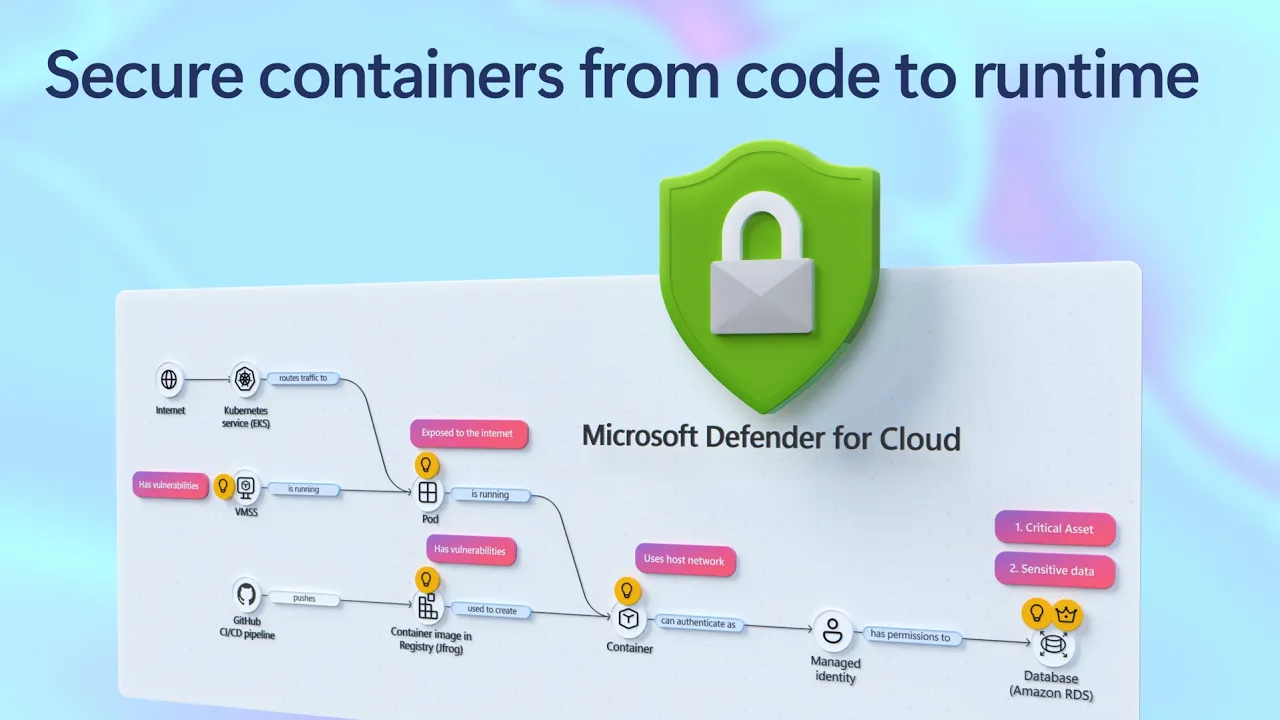
    Secure containers from code to runtime | Microsoft Defender

    Secure containerized apps end-to-end using Microsoft Defender for Cloud. Correlate cross-cloud attacks into a single incident, catch runtime threats that image scanning misses, and block vulnerable images before they reach production. Investigate container hijacking, isolate compromised pods with Security Copilot-guided remediation, and close the loop from SOC to dev by pushing CVE fixes to GitHub and syncing resolution back to Defender. Matt McSpirit, Microsoft Azure expert, shares how to detect, investigate, and remediate container threats in one connected workflow. ► QUICK LINKS: 00:00 - Secure containers in Microsoft Defender 01:02 - Cross-cloud incident 03:07- Runtime detection 04:10 - Investigate and build context 04:49 - Security Copilot incident report & containment 06:03 - Prevention 07:34 - Recommendations and take action 09:04 - Wrap up ► Link References Get started at https://aka.ms/DefenderCloudSecurity ► Unfamiliar with Microsoft Mechanics? As Microsoft's official video series for IT, you can watch and share valuable content and demos of current and upcoming tech from the people who build it at Microsoft. • Subscribe to our YouTube: https://www.youtube.com/c/MicrosoftMechanicsSeries • Talk with other IT Pros, join us on the Microsoft Tech Community: https://techcommunity.microsoft.com/t5/microsoft-mechanics-blog/bg-p/MicrosoftMechanicsBlog • Watch or listen from anywhere, subscribe to our podcast: https://microsoftmechanics.libsyn.com/podcast ► Keep getting this insider knowledge, join us on social: • Follow us on Twitter: https://twitter.com/MSFTMechanics • Share knowledge on LinkedIn: https://www.linkedin.com/company/microsoft-mechanics/ • Enjoy us on Instagram: https://www.instagram.com/msftmechanics/ • Loosen up with us on TikTok: https://www.tiktok.com/@msftmechanics

    • Transcript
  • June 25 · 8 min· Video

    Find and fix app issues - Azure Copilot Observability Agent

    Cut through alert noise and move from detection to root cause using the Azure Copilot Observability Agent. It autonomously investigates incidents, correlates signals across logs, metrics, alerts, application health, and ML anomalies, then surfaces root cause with charts and recommended next steps. Extend coverage to your AI agents in Microsoft Foundry, track Gen AI errors and token consumption with trace-level detail, and write plain-language instructions to tune autonomous behavior to match your team's workflow. Matt McSpirit, Microsoft Azure expert, shares how to take full control of incident response at scale. ► QUICK LINKS: 00:00 - Azure Copilot Observability Agent 00:43 - How to use it as you work 01:33 - Unified Full-Stack Telemetry 02:39 - Root Cause Investigation 04:12 - Investigate further 04:55 - Re-run the investigation 05:36 - Autonomous Alert Correlation & Triage 07:13 - Natural Language Agent Customization 07:34 - Wrap up ► Link References Get started at https://aka.ms/ObservabilityAgent ► Unfamiliar with Microsoft Mechanics? As Microsoft's official video series for IT, you can watch and share valuable content and demos of current and upcoming tech from the people who build it at Microsoft. • Subscribe to our YouTube: https://www.youtube.com/c/MicrosoftMechanicsSeries • Talk with other IT Pros, join us on the Microsoft Tech Community: https://techcommunity.microsoft.com/t5/microsoft-mechanics-blog/bg-p/MicrosoftMechanicsBlog • Watch or listen from anywhere, subscribe to our podcast: https://microsoftmechanics.libsyn.com/podcast ► Keep getting this insider knowledge, join us on social: • Follow us on Twitter: https://twitter.com/MSFTMechanics • Share knowledge on LinkedIn: https://www.linkedin.com/company/microsoft-mechanics/ • Enjoy us on Instagram: https://www.instagram.com/msftmechanics/ • Loosen up with us on TikTok: https://www.tiktok.com/@msftmechanics

    • Transcript
  • June 25 · 15 min· Video

    Build Agent Architecture using AI Landing Zones

    Build enterprise-ready AI agents that scale without sacrificing security or control using Microsoft Azure. Establish a shared Governance Hub to centralize model access, MCP catalogs, and policy enforcement, then give every agent a traceable identity, runtime protection, and data governance through Agent 365. Layer in Microsoft Fabric's Ontologies so your agents reason over real business context, not just raw data. Choose your runtime — no-code, hosted container, or custom — and deploy a production-grade environment in minutes using the AI Landing Zone accelerator. Matt McSpirit, Microsoft Azure Expert, joins Jeremy Chapman, Microsoft 365 Director, to share how to architect, govern, and scale a full agent mesh across the Microsoft stack. ► QUICK LINKS: 00:00 - Build secure AI agents 01:07 - Accelerate development, reduce risks 02:51 - Model Gateway + MCP Gateway 03:24 - Agent 365 Unified Control Plane 03:56 - Azure Policy + Azure Monitor 04:27 - Intelligent data platform 05:37 - OneLake in Microsoft Fabric 06:39 - Microsoft Purview data governance 07:13 - Fabric IQ with Ontologies 07:51 - Landing Zones 09:23 - Three Hosting Runtimes 11:06 - AI Landing Zone Accelerator 13:16 - Scalability 14:16 - Wrap up ► Link References Check out https://aka.ms/AIArchitecture ► Unfamiliar with Microsoft Mechanics? As Microsoft's official video series for IT, you can watch and share valuable content and demos of current and upcoming tech from the people who build it at Microsoft. • Subscribe to our YouTube: https://www.youtube.com/c/MicrosoftMechanicsSeries • Talk with other IT Pros, join us on the Microsoft Tech Community: https://techcommunity.microsoft.com/t5/microsoft-mechanics-blog/bg-p/MicrosoftMechanicsBlog • Watch or listen from anywhere, subscribe to our podcast: https://microsoftmechanics.libsyn.com/podcast ► Keep getting this insider knowledge, join us on social: • Follow us on Twitter: https://twitter.com/MSFTMechanics • Share knowledge on LinkedIn: https://www.linkedin.com/company/microsoft-mechanics/ • Enjoy us on Instagram: https://www.instagram.com/msftmechanics/ • Loosen up with us on TikTok: https://www.tiktok.com/@msftmechanics

    • Transcript
  • June 25 · 10 min· Video

    New Security Controls in Edge for Business

    Enforce your existing Microsoft security policies directly in the browser, where your users actually work, using Microsoft Edge for Business. Extend Conditional Access, Purview DLP, and Defender controls into every session, across managed and unmanaged devices. Block sensitive data from reaching unsanctioned AI services, lock contractors into your data boundary on devices you don't manage, and control clipboard and screenshot actions by location. Manage extensions by permission type from the Microsoft 365 admin center and shut down scareware before users respond. Jeremy Chapman, Microsoft 365 Director, shares how to deploy these controls using the security stack you already have. ► QUICK LINKS: 00:00 - Security built into the browser 01:30 - Shadow AI Data Blocking 03:03 - Contractor Work Profiles 04:22 - Configuration 05:16 - Advanced DLP & Clipboard Controls 06:29 - How to set it up 07:07 - Extension Management 09:20 - Protect from threats 10:13 - Wrap up ► Link References To get started, check out https://aka.ms/EdgeforBusiness ► Unfamiliar with Microsoft Mechanics? As Microsoft's official video series for IT, you can watch and share valuable content and demos of current and upcoming tech from the people who build it at Microsoft. • Subscribe to our YouTube: https://www.youtube.com/c/MicrosoftMechanicsSeries • Talk with other IT Pros, join us on the Microsoft Tech Community: https://techcommunity.microsoft.com/t5/microsoft-mechanics-blog/bg-p/MicrosoftMechanicsBlog • Watch or listen from anywhere, subscribe to our podcast: https://microsoftmechanics.libsyn.com/podcast ► Keep getting this insider knowledge, join us on social: • Follow us on Twitter: https://twitter.com/MSFTMechanics • Share knowledge on LinkedIn: https://www.linkedin.com/company/microsoft-mechanics/ • Enjoy us on Instagram: https://www.instagram.com/msftmechanics/ • Loosen up with us on TikTok: https://www.tiktok.com/@msftmechanics

    • Transcript
Showing 1–20 of 27 episodes