Skip to content
Artwork for CyberCode Academy
CyberCode Academy · August 22 · 20 min

Course 40 - Web Scraping with Python | Episode 42: Web Authentication and Automated Form Input Submission

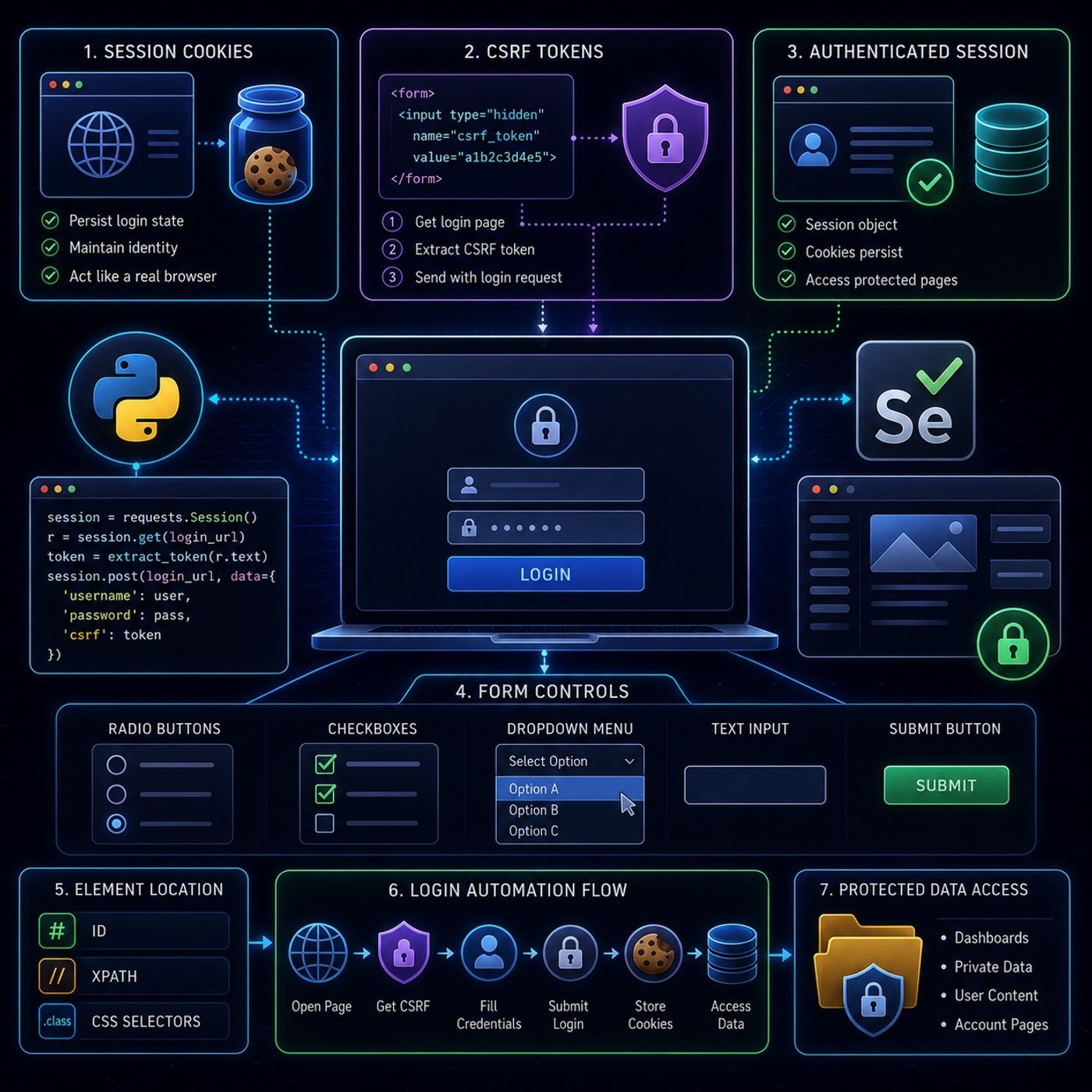
This episode is essentially about turning “login-protected websites” into programmable sessions and then controlling full form workflows like a real user.🔐 Core IdeaModern scraping stops being “download HTML” and becomes:“Authenticate → maintain session → interact → extract”This is the foundation of scraping anything behind a login wall.🍪 1. Session Cookies (Staying Logged In)🧠 What they are: Small identifiers stored after login Tell the server: “this is the same user” Without them: every request looks like a new visitor login state is lost immediately 🐍 How requests handles itYou use a session object:session = requests.Session() Why this matters: cookies persist automatically all requests share authentication state mimics a real browser session 🔥 Key insight:A session object = a “fake browser memory”🧾 2. CSRF Tokens (Hidden Security Gate)🧠 What they are: random hidden string in login forms prevents fake automated submissions Usually found in: hidden fields form HTML source 🕵️ How scraping handles it: Request login page Extract CSRF token from HTML Include it in POST request Example flow:# Step 1: get page r = session.get(login_url) # Step 2: extract token (XPath / parsing) token = extract_token(r.text) # Step 3: submit login session.post(login_url, data={ "username": "...", "password": "...", "csrf": token }) 🔥 Key insight:CSRF tokens force scrapers to behave like real browsers that “see” the page first🧭 3. Selenium for UI InteractionOnce login flows become JavaScript-heavy or interactive, requests is not enough.So Selenium is used for:real browser simulation🔘 4. Handling Form Controls🔵 Radio Buttons only one option selectable used for choices like gender, type, category Action: locate element .click() ☑️ Checkboxes multiple selections allowed toggles true/false state Action: click to toggle state optionally check if already selected 📋 Dropdown MenusHandled using Selenium’s Select class:Options: select by visible text select by value attribute select by index Example logic:from selenium.webdriver.support.ui import Select dropdown = Select(element) dropdown.select_by_visible_text("Option A") 🧠 5. Real Login Automation FlowThis episode combines everything into a full pipeline:Step-by-step: Open login page (Selenium or requests) Extract CSRF token (if exists) Fill credentials Submit form Maintain session (cookies) Access protected pages Extract data ⚙️ 6. Element Location StrategyTo interact with UI elements, you rely on: ID (best case) XPath (fallback, most powerful) CSS selectors 🚨 7. Key Concept ShiftThis episode moves you from:Simple scraping: request page parse HTML To authenticated automation: simulate login flows maintain identity interact with UI controls 🔥 Final TakeawayThe real skill here is:reconstructing the entire user authentication lifecycle in codeOnce you can: handle cookies extract CSRF tokens automate UI forms You can access: dashboards private data portals account-based systems dynamic user content If you want, I can next: combine ALL your episodes into a full advanced scraping architecture (professional blueprint) or show a real-world end-to-end system (login → scrape → clean → store → analyze) or design a portfolio-grade Scrapy + Selenium hybrid project for you You can listen and download our episodes for free on more than 10 different platforms: https://linktr.ee/cybercode_academy

0:00-20:20

transcript

No transcript — this publisher did not publish one.

show notes

This episode is essentially about turning “login-protected websites” into programmable sessions and then controlling full form workflows like a real user.🔐 Core IdeaModern scraping stops being “download HTML” and becomes:“Authenticate → maintain session → interact → extract”This is the foundation of scraping anything behind a login wall.🍪 1. Session Cookies (Staying Logged In)🧠 What they are:
  • Small identifiers stored after login
  • Tell the server: “this is the same user”
Without them:
  • every request looks like a new visitor
  • login state is lost immediately
🐍 How requests handles itYou use a session object:session = requests.Session() Why this matters:
  • cookies persist automatically
  • all requests share authentication state
  • mimics a real browser session
🔥 Key insight:A session object = a “fake browser memory”🧾 2. CSRF Tokens (Hidden Security Gate)🧠 What they are:
  • random hidden string in login forms
  • prevents fake automated submissions
Usually found in:
  • hidden fields
  • form HTML source
🕵️ How scraping handles it:
  1. Request login page
  2. Extract CSRF token from HTML
  3. Include it in POST request
Example flow:# Step 1: get page r = session.get(login_url) # Step 2: extract token (XPath / parsing) token = extract_token(r.text) # Step 3: submit login session.post(login_url, data={ "username": "...", "password": "...", "csrf": token }) 🔥 Key insight:CSRF tokens force scrapers to behave like real browsers that “see” the page first🧭 3. Selenium for UI InteractionOnce login flows become JavaScript-heavy or interactive, requests is not enough.So Selenium is used for:real browser simulation🔘 4. Handling Form Controls🔵 Radio Buttons
  • only one option selectable
  • used for choices like gender, type, category
Action:
  • locate element
  • .click()
☑️ Checkboxes
  • multiple selections allowed
  • toggles true/false state
Action:
  • click to toggle state
  • optionally check if already selected
📋 Dropdown MenusHandled using Selenium’s Select class:Options:
  • select by visible text
  • select by value attribute
  • select by index
Example logic:from selenium.webdriver.support.ui import Select dropdown = Select(element) dropdown.select_by_visible_text("Option A") 🧠 5. Real Login Automation FlowThis episode combines everything into a full pipeline:Step-by-step:
  1. Open login page (Selenium or requests)
  2. Extract CSRF token (if exists)
  3. Fill credentials
  4. Submit form
  5. Maintain session (cookies)
  6. Access protected pages
  7. Extract data
⚙️ 6. Element Location StrategyTo interact with UI elements, you rely on:
  • ID (best case)
  • XPath (fallback, most powerful)
  • CSS selectors
🚨 7. Key Concept ShiftThis episode moves you from:Simple scraping:
  • request page
  • parse HTML
To authenticated automation:
  • simulate login flows
  • maintain identity
  • interact with UI controls
🔥 Final TakeawayThe real skill here is:reconstructing the entire user authentication lifecycle in codeOnce you can:
  • handle cookies
  • extract CSRF tokens
  • automate UI forms
You can access:
  • dashboards
  • private data portals
  • account-based systems
  • dynamic user content
If you want, I can next:
  • combine ALL your episodes into a full advanced scraping architecture (professional blueprint)
  • or show a real-world end-to-end system (login → scrape → clean → store → analyze)
  • or design a portfolio-grade Scrapy + Selenium hybrid project for you


You can listen and download our episodes for free on more than 10 different platforms:
https://linktr.ee/cybercode_academy
links1