Skip to content
Artwork for CyberCode Academy
CyberCode Academy Β· August 21 Β· 11 min

Course 40 - Web Scraping with Python | Episode 41: Mastering GET and POST Form Submissions

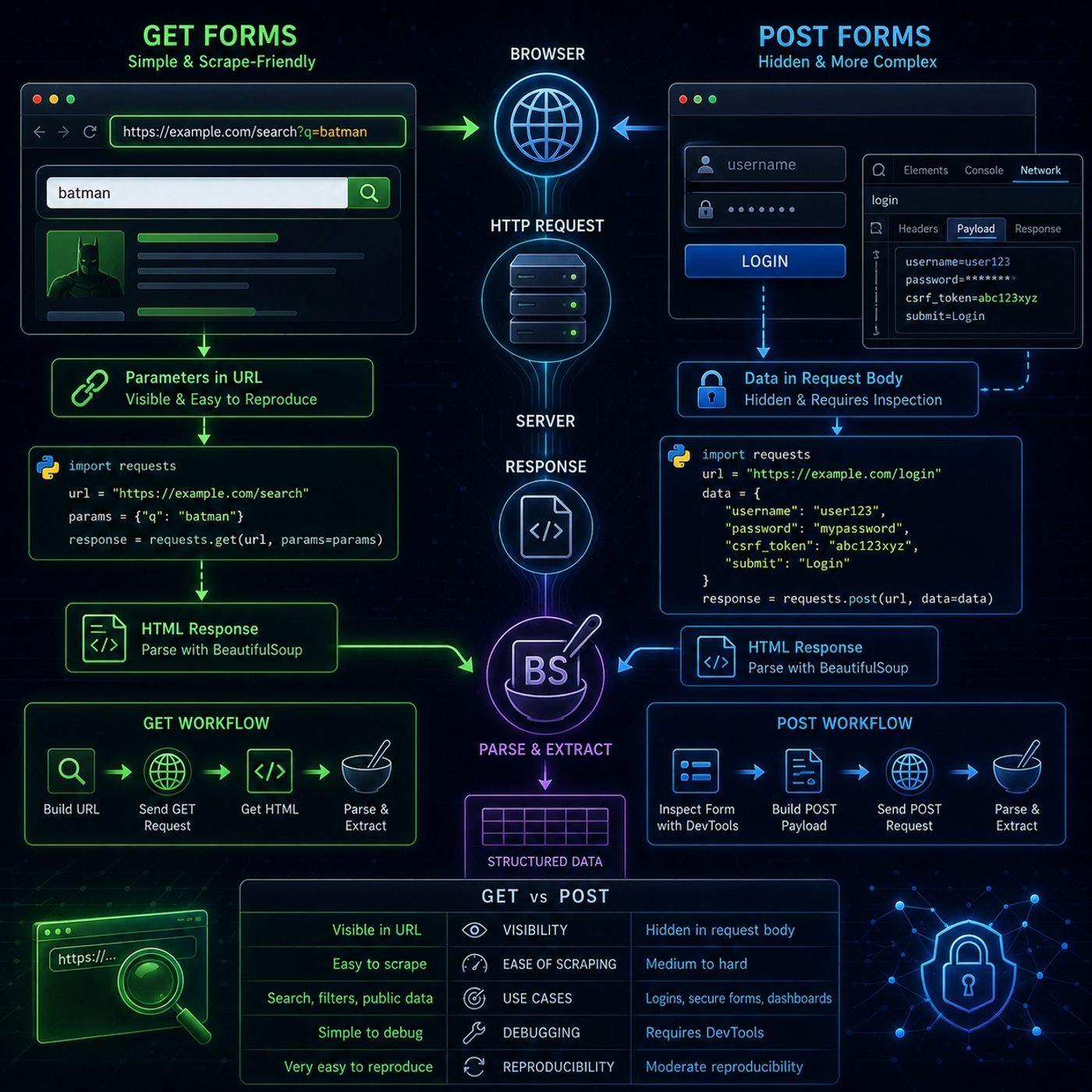
This episode is essentially teaching you how to reverse-engineer web forms into programmatic HTTP requests, which is one of the most important skills in practical scraping.🧭 Core IdeaWeb forms are just structured HTTP requests.So instead of thinking:β€œI’m filling a form”You should think:β€œI’m constructing a GET or POST request that mimics what the browser sendsβ€πŸŒ 1. GET Forms (Simple & Scrape-Friendly)🧠 How they work: User input is appended to the URL Parameters are visible in the address bar Example structure:https://site.com/search?query=batman βœ… Why GET is easy for scrapingBecause you can: copy the URL directly modify query parameters manually reproduce requests with requests.get() 🐍 Typical scraping workflow: send GET request retrieve HTML response parse with BeautifulSoup requests.get(url, params={...}) πŸ”₯ Key insight:GET forms are basically:β€œURL-based APIs disguised as search boxesβ€πŸ”’ 2. POST Forms (Hidden & More Complex)🧠 How they work: data is sent inside the request body not visible in the URL often used for: logins government portals secure searches 🚫 Why POST is harderBecause: parameters are hidden structure is not obvious from URL requires inspecting browser internals πŸ•΅οΈ 3. How to Break Down a POST FormThe episode teaches a key skill:Step 1: Use Developer Tools open Network tab submit the form manually inspect the request payload You extract: form fields hidden inputs request headers payload structure Step 2: Rebuild request in PythonYou convert the captured form data into:requests.post(url, data={...}) Step 3: Parse responseOnce server returns HTML: use BeautifulSoup extract structured data βš™οΈ 4. GET vs POST (Critical Comparison)FeatureGETPOSTVisibilityURL visiblehidden bodyEase of scrapingeasymedium–hardUse casessearch, filterslogin, secure formsDebuggingsimplerequires DevToolsReproducibilityvery highmoderate🧠 5. Core Skill You’re LearningThis episode is not really about forms.It’s about:translating human browser actions into raw HTTP requestsOnce you master that, you can scrape: search engines dashboards government databases login-protected portals (when permitted) 🚨 Important InsightMost β€œscraping difficulty” is not HTML parsing.It is:understanding how the request is built before HTML even existsπŸ”₯ Final TakeawayGET and POST forms are just two ways websites accept input: GET β†’ visible, simple, reusable POST β†’ hidden, structured, requires inspection Once you can replicate both:You can reproduce ~80–90% of real-world web interactions programmatically You can listen and download our episodes for free on more than 10 different platforms: https://linktr.ee/cybercode_academy

0:00-11:32

transcript

No transcript β€” this publisher did not publish one.

show notes

This episode is essentially teaching you how to reverse-engineer web forms into programmatic HTTP requests, which is one of the most important skills in practical scraping.🧭 Core IdeaWeb forms are just structured HTTP requests.So instead of thinking:β€œI’m filling a form”You should think:β€œI’m constructing a GET or POST request that mimics what the browser sendsβ€πŸŒ 1. GET Forms (Simple & Scrape-Friendly)🧠 How they work:
  • User input is appended to the URL
  • Parameters are visible in the address bar
Example structure:https://site.com/search?query=batman βœ… Why GET is easy for scrapingBecause you can:
  • copy the URL directly
  • modify query parameters manually
  • reproduce requests with requests.get()
🐍 Typical scraping workflow:
  • send GET request
  • retrieve HTML response
  • parse with BeautifulSoup
requests.get(url, params={...}) πŸ”₯ Key insight:GET forms are basically:β€œURL-based APIs disguised as search boxesβ€πŸ”’ 2. POST Forms (Hidden & More Complex)🧠 How they work:
  • data is sent inside the request body
  • not visible in the URL
  • often used for:
    • logins
    • government portals
    • secure searches
🚫 Why POST is harderBecause:
  • parameters are hidden
  • structure is not obvious from URL
  • requires inspecting browser internals
πŸ•΅οΈ 3. How to Break Down a POST FormThe episode teaches a key skill:Step 1: Use Developer Tools
  • open Network tab
  • submit the form manually
  • inspect the request payload
You extract:
  • form fields
  • hidden inputs
  • request headers
  • payload structure
Step 2: Rebuild request in PythonYou convert the captured form data into:requests.post(url, data={...}) Step 3: Parse responseOnce server returns HTML:
  • use BeautifulSoup
  • extract structured data
βš™οΈ 4. GET vs POST (Critical Comparison)FeatureGETPOSTVisibilityURL visiblehidden bodyEase of scrapingeasymedium–hardUse casessearch, filterslogin, secure formsDebuggingsimplerequires DevToolsReproducibilityvery highmoderate🧠 5. Core Skill You’re LearningThis episode is not really about forms.It’s about:translating human browser actions into raw HTTP requestsOnce you master that, you can scrape:
  • search engines
  • dashboards
  • government databases
  • login-protected portals (when permitted)
🚨 Important InsightMost β€œscraping difficulty” is not HTML parsing.It is:understanding how the request is built before HTML even existsπŸ”₯ Final TakeawayGET and POST forms are just two ways websites accept input:
  • GET β†’ visible, simple, reusable
  • POST β†’ hidden, structured, requires inspection
Once you can replicate both:You can reproduce ~80–90% of real-world web interactions programmatically

You can listen and download our episodes for free on more than 10 different platforms:
https://linktr.ee/cybercode_academy
links1