Skip to content
Artwork for CyberCode Academy
CyberCode Academy Β· August 17 Β· 18 min

Course 40 - Web Scraping with Python | Episode 37: Integrating Selenium and Beautiful Soup

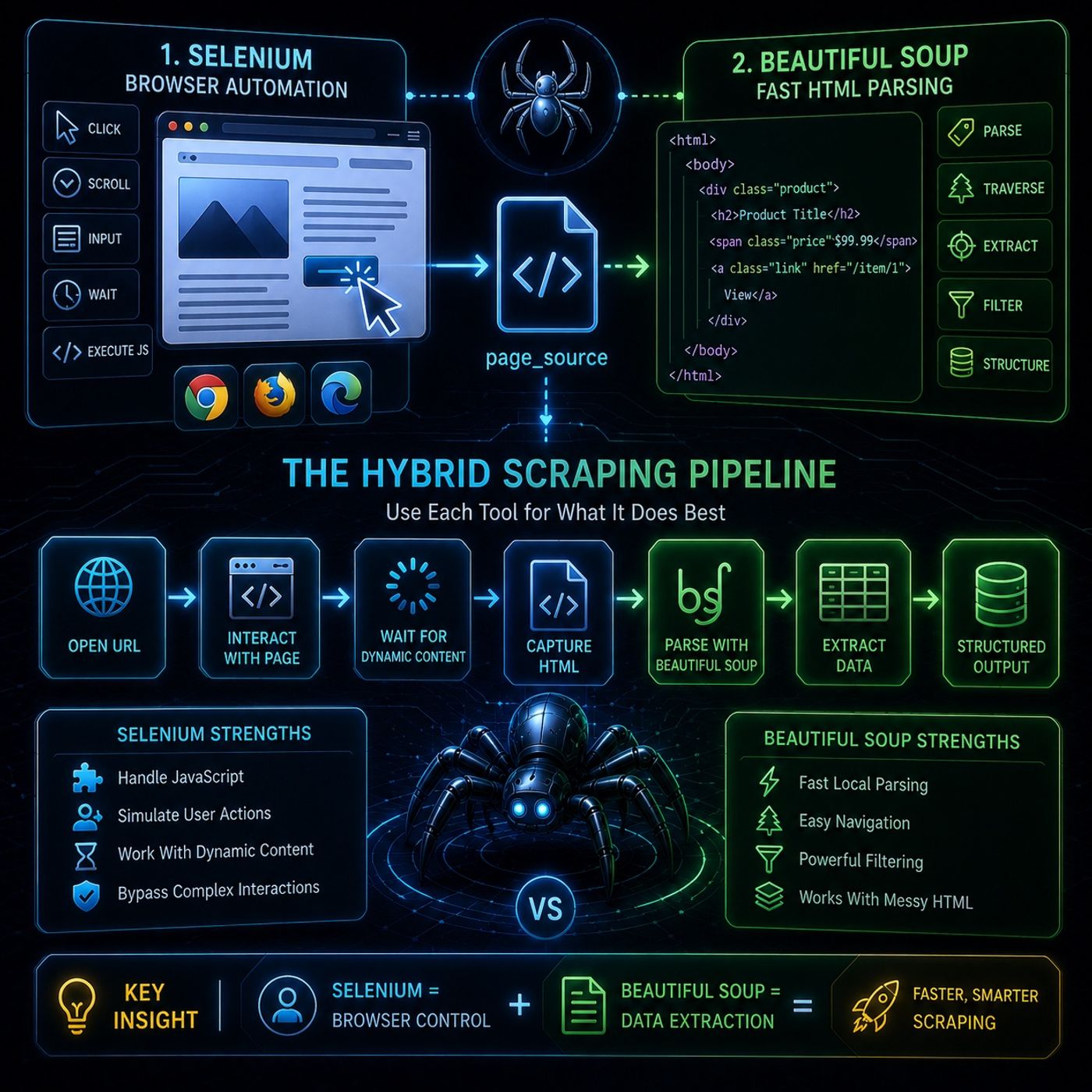
This episode is basically about building a hybrid scraping pipeline where each tool does what it’s best at instead of forcing one tool to do everything.🧩 Core Idea: Split the Problem in TwoModern scraping usually has two phases: Browser simulation (Selenium) HTML parsing (Beautiful Soup) The key insight:Selenium is for interacting with the page, not for extracting data at scale.🧠 1. Beautiful Soup β€” the fast β€œdata reader”Beautiful Soup is introduced as the lightweight parsing engine.What it does well: Parses HTML / XML into a structured tree Handles broken or messy markup automatically Works with different parsers (especially LXML for speed) Core object types: Tag β†’ HTML elements like , NavigableString β†’ text inside tags Comment β†’ HTML commentsBeautifulSoup object β†’ full document containerWhy it matters:It turns raw HTML into something you can query like Python objects instead of scraping strings manually.⚑ 2. Why not just use Selenium for everything?This is the key performance argument:Selenium drawbacks:Every action goes through HTTP (JSON Wire Protocol)Each .find_element() is relatively slowRepeated DOM queries become expensiveSo:Selenium is great for interaction, but inefficient for extraction.πŸ” 3. The Hybrid Strategy (Best Practice)This is the actual workflow the episode teaches:Step 1 β€” Use Selenium for dynamic actionsYou use Selenium to:open the pageclick buttonsscrollfill formswait for JS-rendered contentStep 2 β€” Capture final HTMLOnce the page is fully loaded:grab page_source from SeleniumStep 3 β€” Switch to Beautiful Souppass HTML into Beautiful Soupparse locally in memory (fast)πŸš€ Why this works so wellBecause it separates responsibilities:ToolRoleSeleniumbrowser control (slow, interactive)Beautiful Soupdata extraction (fast, local parsing)🧩 Mental ModelThink of it like this:Selenium = a human controlling a browserBeautiful Soup = a machine reading the saved pageSo instead of repeatedly asking the browser for data, you:load once β†’ extract locally at high speedπŸ”₯ Key TakeawayThe real optimization is not β€œuse better selectors” β€” it’s:β€œstop scraping live DOM repeatedly and instead parse a snapshot of it” You can listen and download our episodes for free on more than 10 different platforms: https://linktr.ee/cybercode_academy

0:00-18:07

transcript

No transcript β€” this publisher did not publish one.

show notes

This episode is basically about building a hybrid scraping pipeline where each tool does what it’s best at instead of forcing one tool to do everything.🧩 Core Idea: Split the Problem in TwoModern scraping usually has two phases:
  1. Browser simulation (Selenium)
  2. HTML parsing (Beautiful Soup)
The key insight:Selenium is for interacting with the page, not for extracting data at scale.🧠 1. Beautiful Soup β€” the fast β€œdata reader”Beautiful Soup is introduced as the lightweight parsing engine.What it does well:
  • Parses HTML / XML into a structured tree
  • Handles broken or messy markup automatically
  • Works with different parsers (especially LXML for speed)
Core object types:
  • Tag β†’ HTML elements like ,
  • NavigableString β†’ text inside tags
Comment β†’ HTML commentsBeautifulSoup object β†’ full document containerWhy it matters:It turns raw HTML into something you can query like Python objects instead of scraping strings manually.⚑ 2. Why not just use Selenium for everything?This is the key performance argument:Selenium drawbacks:Every action goes through HTTP (JSON Wire Protocol)Each .find_element() is relatively slowRepeated DOM queries become expensiveSo:Selenium is great for interaction, but inefficient for extraction.πŸ” 3. The Hybrid Strategy (Best Practice)This is the actual workflow the episode teaches:Step 1 β€” Use Selenium for dynamic actionsYou use Selenium to:open the pageclick buttonsscrollfill formswait for JS-rendered contentStep 2 β€” Capture final HTMLOnce the page is fully loaded:grab page_source from SeleniumStep 3 β€” Switch to Beautiful Souppass HTML into Beautiful Soupparse locally in memory (fast)πŸš€ Why this works so wellBecause it separates responsibilities:ToolRoleSeleniumbrowser control (slow, interactive)Beautiful Soupdata extraction (fast, local parsing)🧩 Mental ModelThink of it like this:Selenium = a human controlling a browserBeautiful Soup = a machine reading the saved pageSo instead of repeatedly asking the browser for data, you:load once β†’ extract locally at high speedπŸ”₯ Key TakeawayThe real optimization is not β€œuse better selectors” β€” it’s:β€œstop scraping live DOM repeatedly and instead parse a snapshot of it”

You can listen and download our episodes for free on more than 10 different platforms:
https://linktr.ee/cybercode_academy
links1