Skip to content
Artwork for CyberCode Academy
CyberCode Academy · August 15 · 20 min

Course 40 - Web Scraping with Python | Episode 35: Locating Dynamic Elements with Selenium and Python

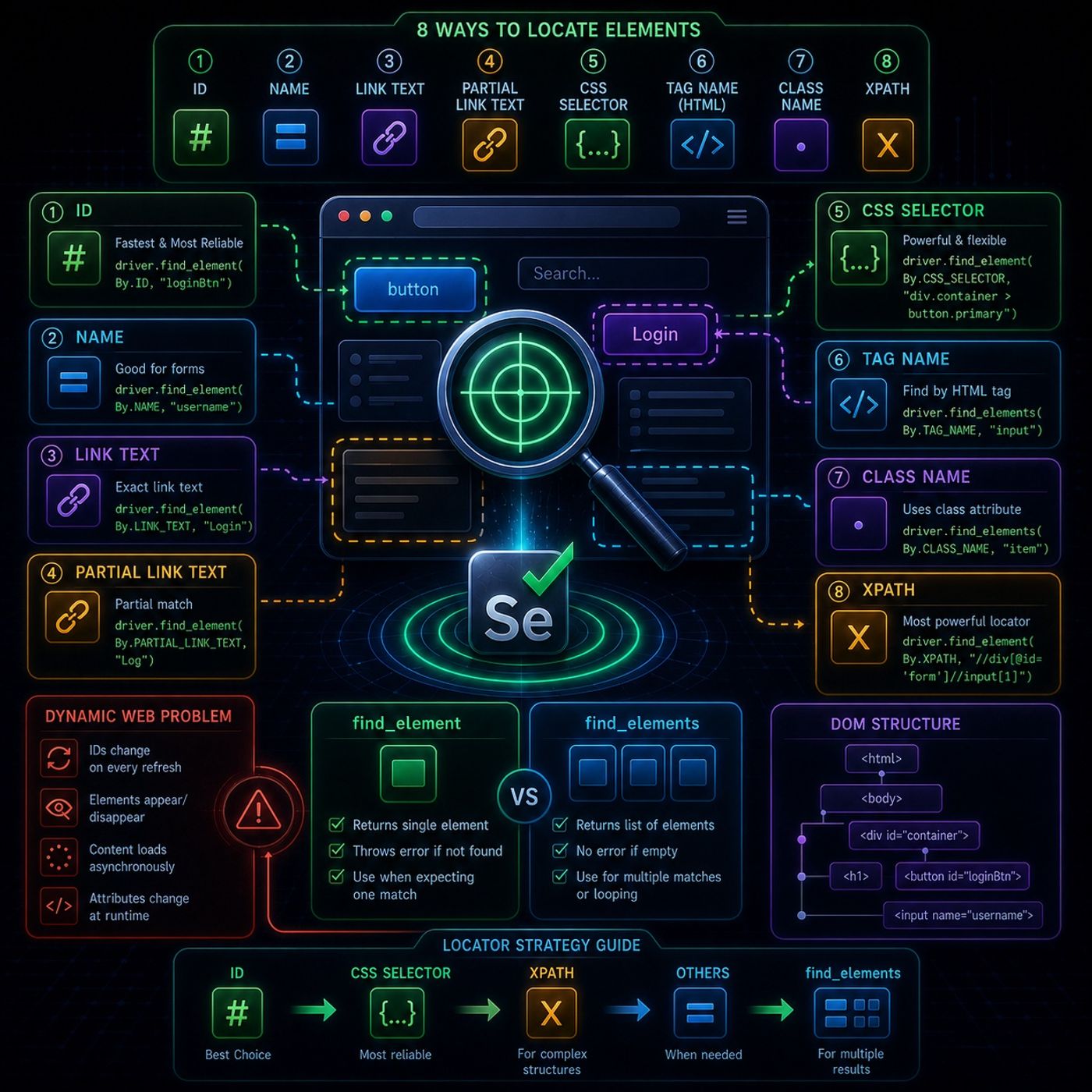
This module is basically about the core skill in Selenium automation: reliably finding the right element on a page that keeps changing.🧩 What “locating elements” really meansIn Selenium, everything you interact with is a web element, such as: buttons input fields links images hidden UI components used by JavaScript Modern web apps are often dynamic, meaning: IDs change on every refresh classes are generated randomly elements appear/disappear after AJAX calls So the real challenge is not clicking elements — it’s finding them consistently.⚠️ The Dynamic Web ProblemUnlike static HTML pages, modern JavaScript-heavy sites: regenerate DOM elements constantly load content asynchronously modify attributes at runtime That’s why a locator that works once may fail on the next page load.🔍 The 8 Ways to Locate ElementsSelenium gives multiple strategies. Each has a different “strength level”.1. 🆔 ID (Best option) Fastest and most reliable Must be unique Breaks only if developers change structure 2. 🏷️ Name Works when ID is missing Common in forms 3. 🔗 Link Text Matches full hyperlink text Example: “Login” Partial Link Text Matches part of a link More flexible but less precise 4. 🎯 CSS Selectors Very powerful and widely used Uses patterns like: classes hierarchy attributes Example idea:“div.container button.primary”5. 🧱 Tag Name Finds elements like , , Usually returns many results 6. 🎨 Class NameUses CSS class attributeRisk: many elements share same class7. 🧭 XPath (Most powerful)Can navigate DOM like a treeWorks even when structure is messyKey advantage:supports relative pathscan search based on text, attributes, hierarchy⚙️ Two Core Retrieval Methods🔹 find_elementreturns single elementthrows error if not foundbest when you expect exactly one match🔹 find_elementsreturns list of elementssafe (no exception if empty)you can loop or index results🧠 Practical InsightThe real decision rule is:Use ID firstIf not available → CSS SelectorIf structure is complex → XPathIf multiple results → find_elements⚡ Key TakeawayThis module is really teaching one idea:Selenium automation fails not because of actions, but because of bad element selection strategiesSo robust scraping depends on:choosing stable attributesavoiding fragile selectorshandling dynamic DOM changes You can listen and download our episodes for free on more than 10 different platforms: https://linktr.ee/cybercode_academy

0:00-20:22

transcript

No transcript — this publisher did not publish one.

show notes

This module is basically about the core skill in Selenium automation: reliably finding the right element on a page that keeps changing.🧩 What “locating elements” really meansIn Selenium, everything you interact with is a web element, such as:
  • buttons
  • input fields
  • links
  • images
  • hidden UI components used by JavaScript
Modern web apps are often dynamic, meaning:
  • IDs change on every refresh
  • classes are generated randomly
  • elements appear/disappear after AJAX calls
So the real challenge is not clicking elements — it’s finding them consistently.⚠️ The Dynamic Web ProblemUnlike static HTML pages, modern JavaScript-heavy sites:
  • regenerate DOM elements constantly
  • load content asynchronously
  • modify attributes at runtime
That’s why a locator that works once may fail on the next page load.🔍 The 8 Ways to Locate ElementsSelenium gives multiple strategies. Each has a different “strength level”.1. 🆔 ID (Best option)
  • Fastest and most reliable
  • Must be unique
  • Breaks only if developers change structure
2. 🏷️ Name
  • Works when ID is missing
  • Common in forms
3. 🔗 Link Text
  • Matches full hyperlink text
  • Example: “Login”
Partial Link Text
  • Matches part of a link
  • More flexible but less precise
4. 🎯 CSS Selectors
  • Very powerful and widely used
  • Uses patterns like:
    • classes
    • hierarchy
    • attributes
Example idea:“div.container button.primary”5. 🧱 Tag Name
  • Finds elements like , ,
  • Usually returns many results
6. 🎨 Class NameUses CSS class attributeRisk: many elements share same class7. 🧭 XPath (Most powerful)Can navigate DOM like a treeWorks even when structure is messyKey advantage:supports relative pathscan search based on text, attributes, hierarchy⚙️ Two Core Retrieval Methods🔹 find_elementreturns single elementthrows error if not foundbest when you expect exactly one match🔹 find_elementsreturns list of elementssafe (no exception if empty)you can loop or index results🧠 Practical InsightThe real decision rule is:Use ID firstIf not available → CSS SelectorIf structure is complex → XPathIf multiple results → find_elements⚡ Key TakeawayThis module is really teaching one idea:Selenium automation fails not because of actions, but because of bad element selection strategiesSo robust scraping depends on:choosing stable attributesavoiding fragile selectorshandling dynamic DOM changes

You can listen and download our episodes for free on more than 10 different platforms:
https://linktr.ee/cybercode_academy
links1