Skip to content
Artwork for CyberCode Academy
CyberCode Academy Β· August 13 Β· 20 min

Course 40 - Web Scraping with Python | Episode 33: Foundations of Scraping Dynamic Webpages with Python and Selenium

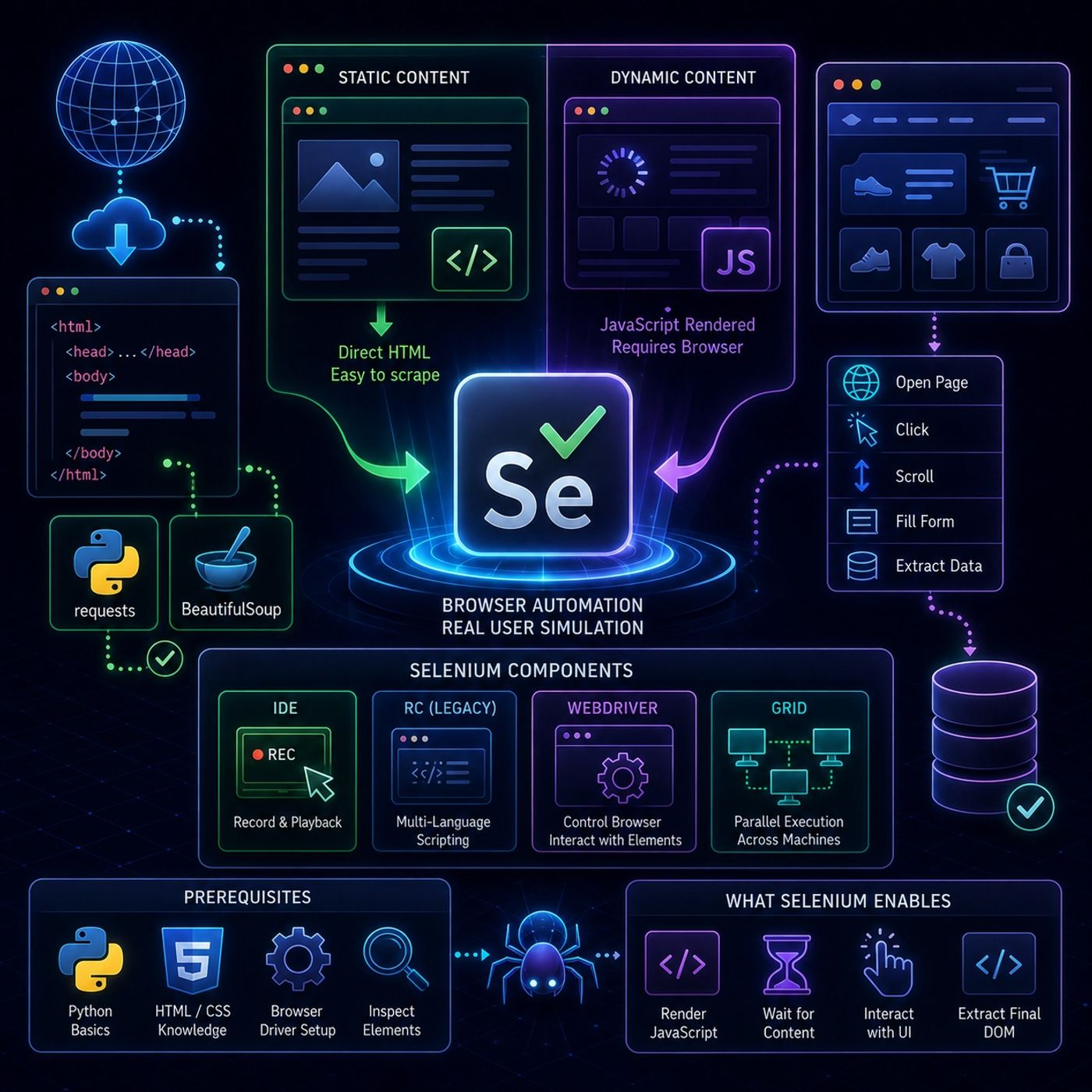
This episode is essentially a setup guide for moving from simple HTTP-based scraping to full browser automation using Selenium, especially for websites where content is rendered or modified by JavaScript.🌐 Web Scraping vs Dynamic Web Pages🧾 What β€œweb scraping” means hereWeb scraping is framed as:Converting web page content into structured data for analysisBut the key challenge is that not all content is immediately visible in HTML.🧱 Static vs Dynamic ContentπŸ“„ Static content Same HTML for every user Can be scraped with tools like Requests or BeautifulSoup No JavaScript dependency ⚑ Dynamic content Changes based on: user interaction time location JavaScript execution Often not present in raw HTML Requires browser simulation to access πŸ€– Why Selenium is NeededTraditional scrapers only download HTML.But modern websites: render content with JavaScript load data after page load require clicks/scrolling to reveal content πŸ‘‰ Selenium solves this by controlling a real browser.🧰 Selenium OverviewSelenium is described as an automation framework for browsers, not just a scraping tool.It allows you to: open web pages click buttons scroll pages fill forms simulate real users 🧩 Core Selenium Components1. πŸ§ͺ Selenium IDE Record & playback tool Used for quick prototyping No coding required 2. 🧬 Selenium RC (Legacy) First generation framework Allowed multi-language test scripts Now largely obsolete 3. 🧭 Selenium WebDriver (Main tool)This is the core engine used in real projectsIt: directly controls the browser executes user-like actions interacts with page elements πŸ‘‰ This is the most important part for scraping dynamic sites4. 🌐 Selenium Grid Enables parallel execution Runs tests across multiple machines/browsers Used for scaling automation βš™οΈ Prerequisites for Using SeleniumBefore practical usage, you need: Python basics HTML/CSS understanding Browser driver setup (ChromeDriver / GeckoDriver conceptually) Ability to inspect web elements πŸš€ What Selenium Enables in ScrapingWith Selenium WebDriver, you can: load JavaScript-heavy pages wait for content to appear interact with UI elements extract final rendered DOM This is crucial for modern websites like: dashboards social media pages e-commerce filters infinite scroll pages 🧠 Key InsightThe main takeaway is:Traditional scrapers read HTML. Selenium scrapes the rendered browser state.That difference is what makes it powerful for dynamic content. You can listen and download our episodes for free on more than 10 different platforms: https://linktr.ee/cybercode_academy

0:00-20:06

transcript

No transcript β€” this publisher did not publish one.

show notes

This episode is essentially a setup guide for moving from simple HTTP-based scraping to full browser automation using Selenium, especially for websites where content is rendered or modified by JavaScript.🌐 Web Scraping vs Dynamic Web Pages🧾 What β€œweb scraping” means hereWeb scraping is framed as:Converting web page content into structured data for analysisBut the key challenge is that not all content is immediately visible in HTML.🧱 Static vs Dynamic ContentπŸ“„ Static content
  • Same HTML for every user
  • Can be scraped with tools like Requests or BeautifulSoup
  • No JavaScript dependency
⚑ Dynamic content
  • Changes based on:
    • user interaction
    • time
    • location
    • JavaScript execution
  • Often not present in raw HTML
  • Requires browser simulation to access
πŸ€– Why Selenium is NeededTraditional scrapers only download HTML.But modern websites:
  • render content with JavaScript
  • load data after page load
  • require clicks/scrolling to reveal content
πŸ‘‰ Selenium solves this by controlling a real browser.🧰 Selenium OverviewSelenium is described as an automation framework for browsers, not just a scraping tool.It allows you to:
  • open web pages
  • click buttons
  • scroll pages
  • fill forms
  • simulate real users
🧩 Core Selenium Components1. πŸ§ͺ Selenium IDE
  • Record & playback tool
  • Used for quick prototyping
  • No coding required
2. 🧬 Selenium RC (Legacy)
  • First generation framework
  • Allowed multi-language test scripts
  • Now largely obsolete
3. 🧭 Selenium WebDriver (Main tool)This is the core engine used in real projectsIt:
  • directly controls the browser
  • executes user-like actions
  • interacts with page elements
πŸ‘‰ This is the most important part for scraping dynamic sites4. 🌐 Selenium Grid
  • Enables parallel execution
  • Runs tests across multiple machines/browsers
  • Used for scaling automation
βš™οΈ Prerequisites for Using SeleniumBefore practical usage, you need:
  • Python basics
  • HTML/CSS understanding
  • Browser driver setup (ChromeDriver / GeckoDriver conceptually)
  • Ability to inspect web elements
πŸš€ What Selenium Enables in ScrapingWith Selenium WebDriver, you can:
  • load JavaScript-heavy pages
  • wait for content to appear
  • interact with UI elements
  • extract final rendered DOM
This is crucial for modern websites like:
  • dashboards
  • social media pages
  • e-commerce filters
  • infinite scroll pages
🧠 Key InsightThe main takeaway is:Traditional scrapers read HTML. Selenium scrapes the rendered browser state.That difference is what makes it powerful for dynamic content.

You can listen and download our episodes for free on more than 10 different platforms:
https://linktr.ee/cybercode_academy
links1