Skip to content
Artwork for CyberCode Academy
CyberCode Academy Β· July 26 Β· 19 min

Course 40 - Web Scraping with Python | Episode 16: Mastering Data Extraction with Beautiful Soup

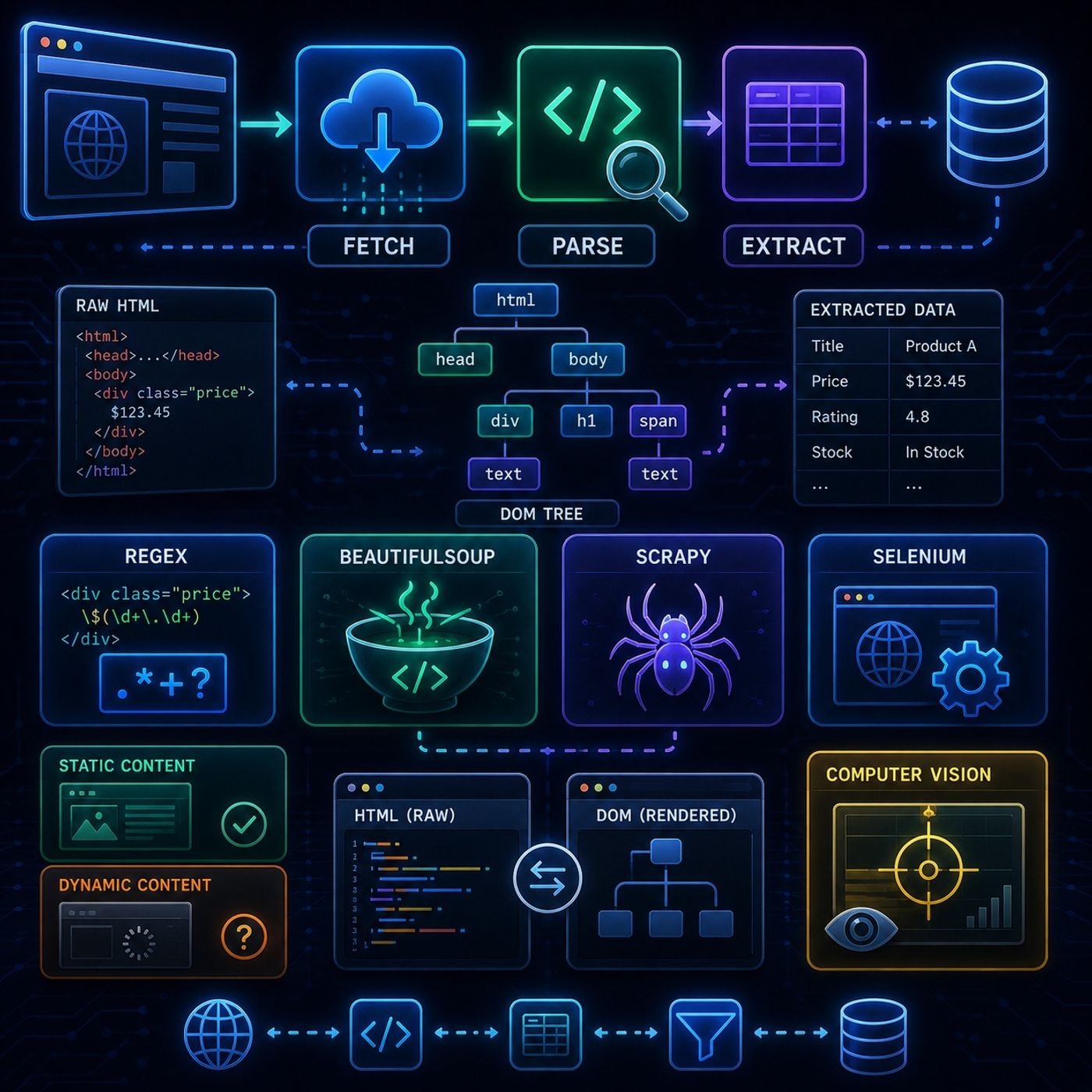
In this lesson, you’ll learn about: how web scraping works end-to-end, why fetching and parsing are the two core stages, and how different tools like Regex, BeautifulSoup, and Scrapy compare in real-world data extraction1. What is Web Scraping?πŸ”Ή Core IdeaWeb scraping = automated data extraction from websitesInstead of manually copying data, a program: Visits a page Reads the HTML Extracts structured information 2. Two-Phase Scraping WorkflowπŸ”Ή Overall PipelinePhase 1: Fetching Content Send HTTP request (GET) Receive HTML response Store raw page content Tools: Requests urllib httplib2 Phase 2: Parsing & Extraction Analyze HTML structure Extract required data Clean results 3. Regex vs Structured ParsersπŸ”Ή Regular ExpressionsRegex: Works on text patterns Fast but fragile Breaks easily on messy HTML πŸ‘‰ Key Insight HTML is not flat textβ€”it’s structured data4. BeautifulSoup (Structure-Aware Parsing)πŸ”Ή Why It Works BetterBeautifulSoup: Understands HTML tree structure Fixes broken markup Lets you navigate elements easily πŸ”Ή Key AdvantageInstead of guessing text patterns:πŸ‘‰ you navigate the DOM like a tree5. HTML vs DOM ParsingTypeDescriptionHTML parsingRaw server outputDOM parsingRendered browser structureπŸ”Ή Important Difference HTML = static snapshot DOM = live, updated by JavaScript 6. Static vs Dynamic ContentπŸ”Ή Static Pages Easy to scrape No JavaScript required BeautifulSoup works well πŸ”Ή Dynamic Pages Content generated by JavaScript Requires browser rendering Tools: Selenium Scrapy Headless browsers πŸ‘‰ Key Insight If data appears after page load β†’ you need a browser engine7. Advanced Tools OverviewπŸ”Ή Scrapy (Industrial Tool) Built for scale Handles crawling + pipelines Used for production systems πŸ”Ή Selenium Controls real browser Handles JavaScript Slower but powerful πŸ”Ή Computer Vision Scraping (Sikuli) Reads screen pixels Works without HTML Used when UI has no accessible structure 8. Mental ModelThink of scraping as: πŸ“₯ Fetch β†’ download the page 🧠 Parse β†’ understand structure 🎯 Extract β†’ get useful data Final TakeawayWeb scraping is not just β€œcopying data”—it’s a structured pipeline:πŸ‘‰ fetch β†’ parse β†’ extract β†’ transformAnd the tool you choose depends on one question:Is the data static HTML or dynamically generated?That single decision determines everything else. You can listen and download our episodes for free on more than 10 different platforms: https://linktr.ee/cybercode_academy

0:00-19:11

transcript

No transcript β€” this publisher did not publish one.

show notes

In this lesson, you’ll learn about: how web scraping works end-to-end, why fetching and parsing are the two core stages, and how different tools like Regex, BeautifulSoup, and Scrapy compare in real-world data extraction1. What is Web Scraping?πŸ”Ή Core IdeaWeb scraping = automated data extraction from websitesInstead of manually copying data, a program:
  • Visits a page
  • Reads the HTML
  • Extracts structured information
2. Two-Phase Scraping WorkflowπŸ”Ή Overall PipelinePhase 1: Fetching Content
  • Send HTTP request (GET)
  • Receive HTML response
  • Store raw page content
Tools:
  • Requests
  • urllib
  • httplib2
Phase 2: Parsing & Extraction
  • Analyze HTML structure
  • Extract required data
  • Clean results
3. Regex vs Structured ParsersπŸ”Ή Regular ExpressionsRegex:
  • Works on text patterns
  • Fast but fragile
  • Breaks easily on messy HTML
πŸ‘‰ Key Insight
HTML is not flat textβ€”it’s structured data4. BeautifulSoup (Structure-Aware Parsing)πŸ”Ή Why It Works BetterBeautifulSoup:
  • Understands HTML tree structure
  • Fixes broken markup
  • Lets you navigate elements easily
πŸ”Ή Key AdvantageInstead of guessing text patterns:πŸ‘‰ you navigate the DOM like a tree5. HTML vs DOM ParsingTypeDescriptionHTML parsingRaw server outputDOM parsingRendered browser structureπŸ”Ή Important Difference
  • HTML = static snapshot
  • DOM = live, updated by JavaScript
6. Static vs Dynamic ContentπŸ”Ή Static Pages
  • Easy to scrape
  • No JavaScript required
  • BeautifulSoup works well
πŸ”Ή Dynamic Pages
  • Content generated by JavaScript
  • Requires browser rendering
Tools:
  • Selenium
  • Scrapy
  • Headless browsers
πŸ‘‰ Key Insight
If data appears after page load β†’ you need a browser engine7. Advanced Tools OverviewπŸ”Ή Scrapy (Industrial Tool)
  • Built for scale
  • Handles crawling + pipelines
  • Used for production systems
πŸ”Ή Selenium
  • Controls real browser
  • Handles JavaScript
  • Slower but powerful
πŸ”Ή Computer Vision Scraping (Sikuli)
  • Reads screen pixels
  • Works without HTML
  • Used when UI has no accessible structure
8. Mental ModelThink of scraping as:
  • πŸ“₯ Fetch β†’ download the page
  • 🧠 Parse β†’ understand structure
  • 🎯 Extract β†’ get useful data
Final TakeawayWeb scraping is not just β€œcopying data”—it’s a structured pipeline:πŸ‘‰ fetch β†’ parse β†’ extract β†’ transformAnd the tool you choose depends on one question:Is the data static HTML or dynamically generated?That single decision determines everything else.

You can listen and download our episodes for free on more than 10 different platforms:
https://linktr.ee/cybercode_academy
links1